Audio Clipping Explained: What It Means, What It Sounds Like How to Fix It
Table of Contents
What Does Clipping Mean in Audio?
Is Clipping the Same as Peaking?
Why Does Audio Clipping Happen?
How to Prevent Audio Clipping While Recording
Key Takeaways
Audio clipping happens when a signal becomes too loud for your audio system to handle.
In digital audio, clipping usually happens when a signal goes above 0 dBFS.
Clipping can make audio sound harsh, crackly, crunchy, brittle, or distorted.
Peaking and clipping are related, but they are not the same thing.
The best way to prevent clipping is to leave headroom, use gain staging, and avoid pushing everything into the red.
Ever finished a mix on headphones, played it in your car, and heard a crunchy, distorted mess? Welcome to the club. That’s audio clipping.
I still remember trying to mix my very first track, Back of the Pub. I didn't exactly have a clue what I was doing back then, but the harsh, distorted sound that came out of my speakers was a brutal wake-up call. That poor bass never stood a chance.
Audio clipping is one of the most common issues beginner producers run into. It happens when a signal gets way too loud for your system to handle, creating some seriously unwanted distortion.
What Does Clipping Mean in Audio?
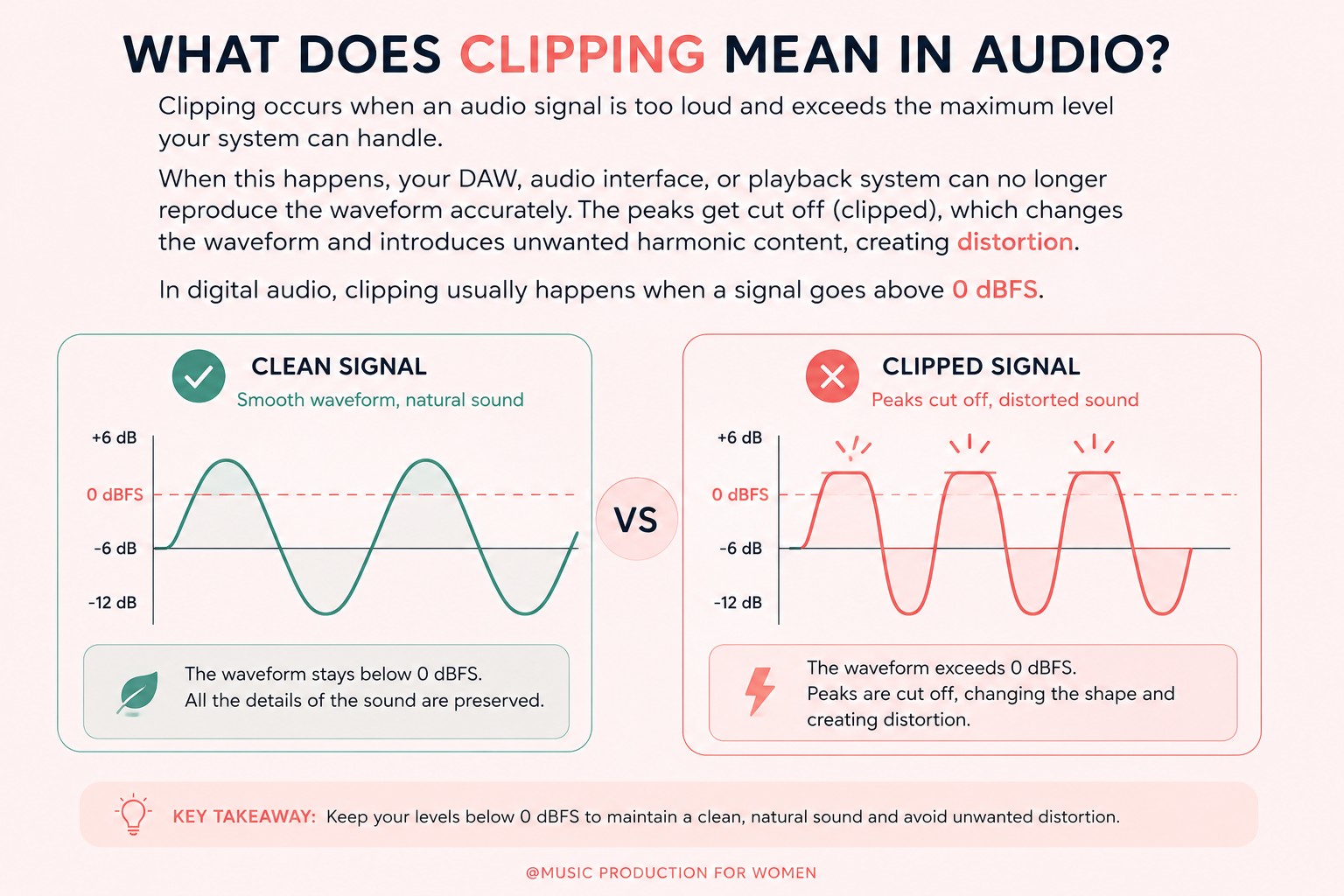
Clipping in audio means that your signal has become too loud and has exceeded the maximum level your audio system can handle.
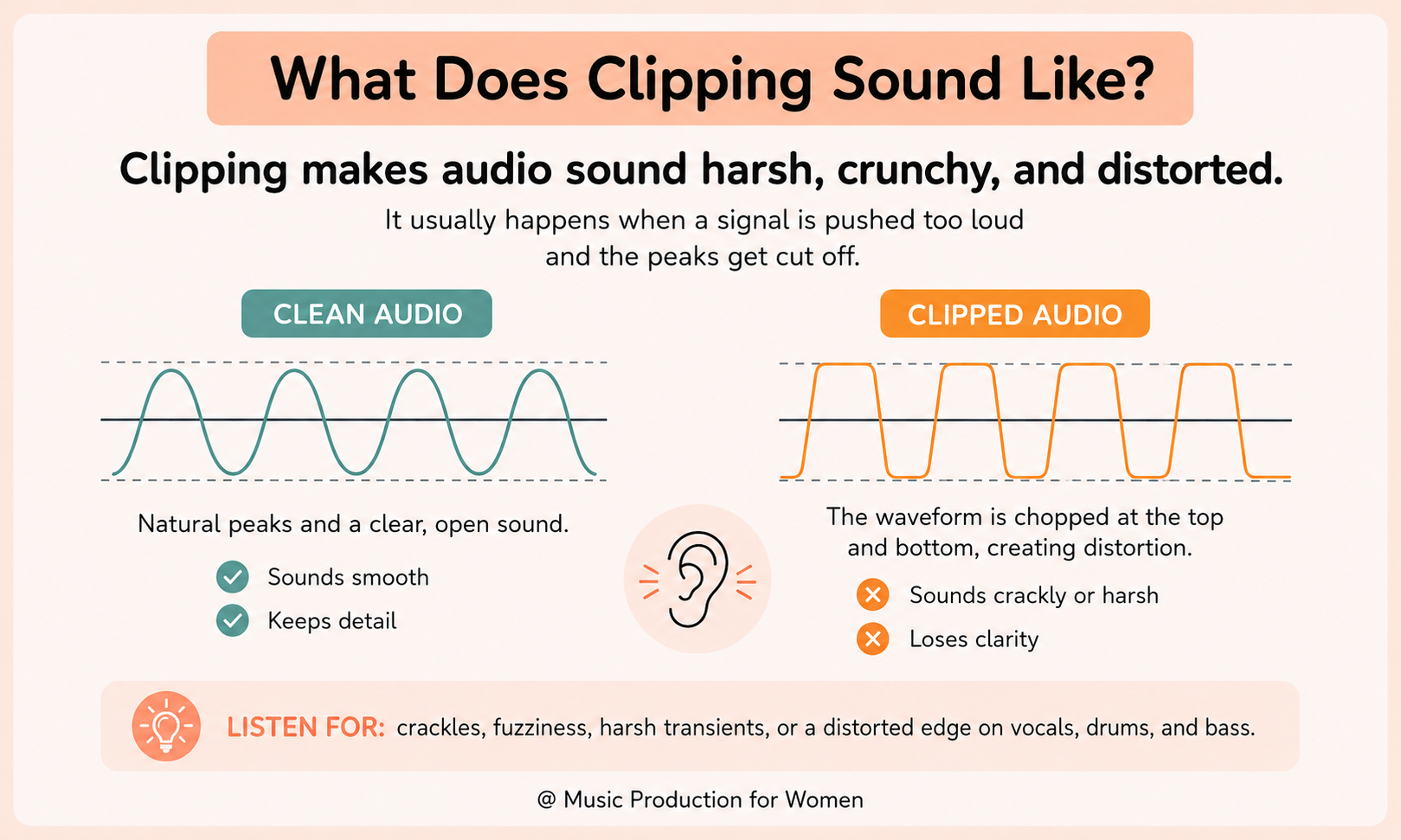
When this happens, your DAW, audio interface, or playback system can no longer accurately reproduce the full shape of the sound wave. Instead of following its natural curve, the highest and lowest peaks of the waveform are cut off (clipped), flattening the signal.
This creates distortion because the waveform is no longer identical to the original sound. When those smooth peaks are flattened, the signal's shape changes, introducing unwanted harmonic content. This is why clipped audio often sounds harsh.
In digital audio, clipping usually occurs when a signal exceeds 0 dBFS. Once the signal crosses that limit, the audio can become distorted.
What Is Audio Clipping?
So, what is audio clipping in a music production session?
Audio clipping is a type of distortion that happens when an audio signal runs out of headroom. Headroom is the space between your current signal level and the maximum level your system can handle before distortion occurs.
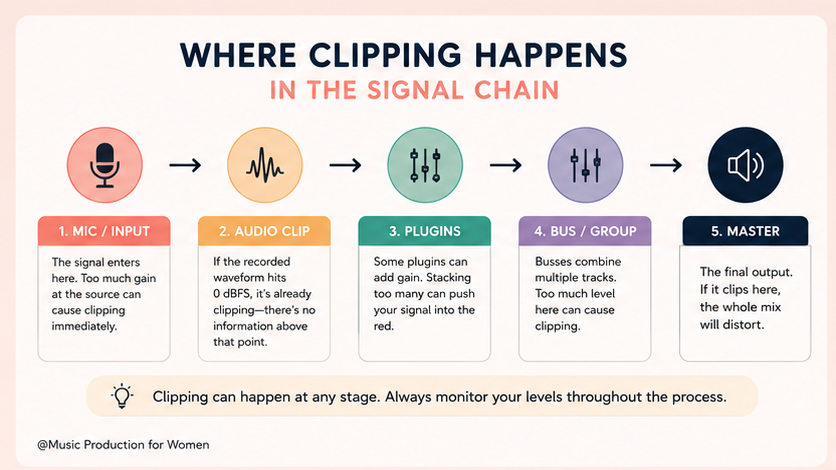
In practice, clipping can happen at different stages of your workflow. It might happen while recording if your microphone or instrument input is too loud. It can also happen inside your DAW if plugins add too much gain, if several tracks build up too much level together, or if the master channel is pushed too close to 0 dBFS.
Audio clipping can easily sneak up on you while you are:
Recording vocals or live instruments, like when a singer suddenly belts out a massive note;
Using plugins that increase gain, e.g., saturators, EQs, and compressors, can sneakily boost your volume;
Mixing multiple tracks together, even if the single tracks are fine, they get too loud when playing all at once;
Pushing the master channel too loud, ignoring those angry red lights;
Exporting your final track, if your master is running too hot, the exact moment you hit "export" is when the DAW permanently prints that clipping into your final WAV or MP3 file.
The result is usually a sound that feels harsh, or broken, especially on loud peaks like vocal belts, drum hits, bass drops, or big chorus sections.
What Is a Clipping Sound?
A clipping sound is usually harsh, crunchy, crackly, fuzzy, or distorted. It often happens on the loudest parts of a recording or mix, such as vocal peaks, drum hits, bass drops, or the master output.
Common examples of a clipping sound include:
a vocal sounding sharp or broken on the loudest words
a kick drum sounding too crunchy and losing its punch
the full mix sounding harsh when the chorus comes in
the master meter going into the red
the track feeling loud but tiring to listen to
Not all distortion is bad. Some distortion is used creatively in music production. But accidental clipping usually sounds uncontrolled and unpleasant.
Is Clipping the Same as Peaking?
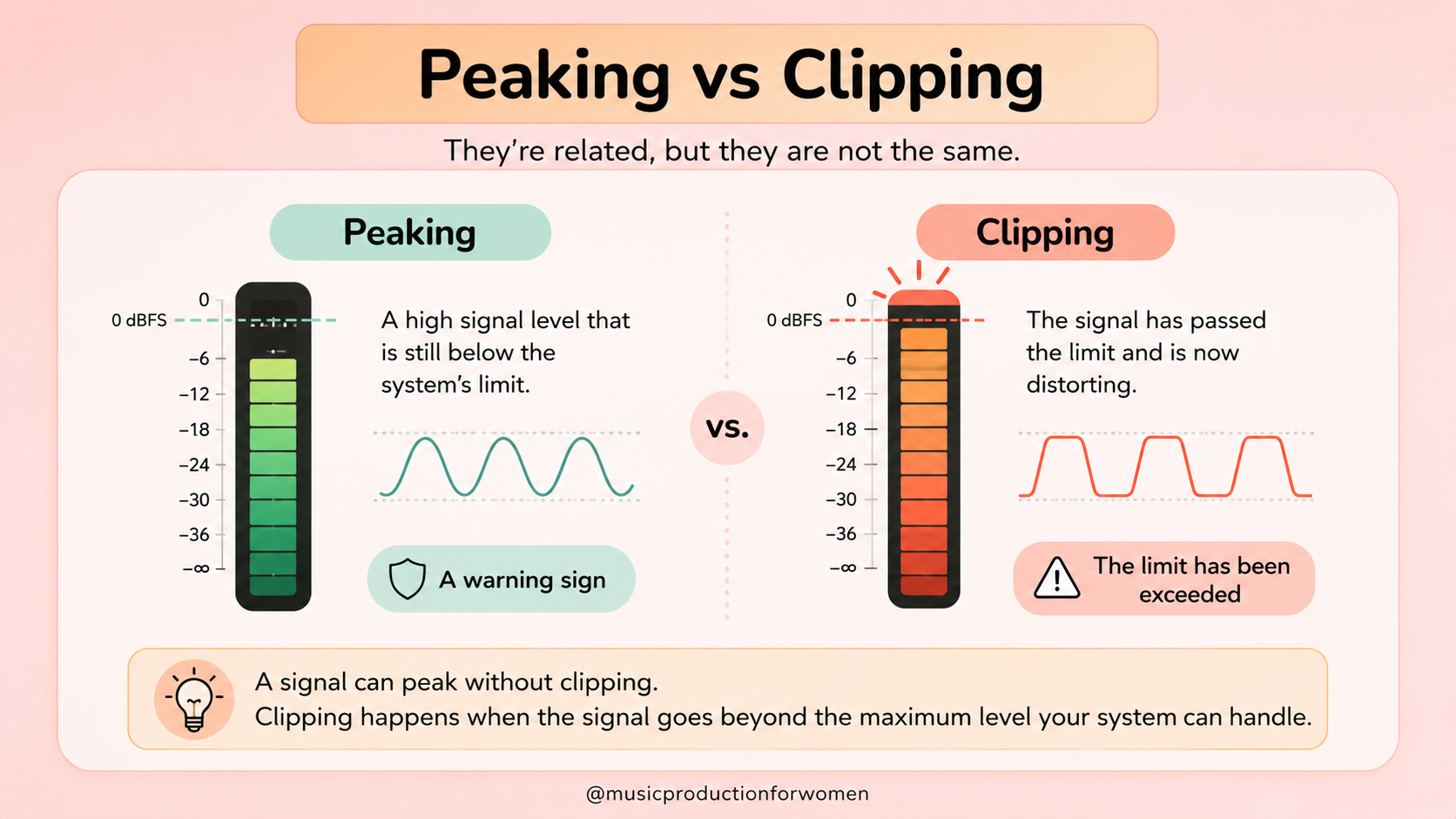
No, clipping is not the same as peaking.
Peaking means your audio signal is reaching a high level. It is a warning sign.
Clipping means your audio signal has gone too high and is distorting. The signal has passed the limit.
A signal can peak without clipping if it stays below the maximum level. But if the signal goes above the limit your system can handle, it can clip.
Why Does Audio Clipping Happen?
Audio clipping usually happens for one simple reason: your signal got too loud somewhere along your recording or mixing chain. Here are the usual suspects:
Your input gain is too high: If your microphone or instrument input is blasting before it even reaches your DAW, the audio will clip right at the source (your interface);
Your track volume is too loud: A single, lonely track can easily clip if you push its fader way past its comfort zone;
Plugins are secretly adding gain: EQs, compressors, saturators, and limiters can all sneakily crank up your volume. Sometimes a plugin makes the signal louder without you even realizing it;
Too many tracks are playing together: Even if every individual track is behaving perfectly on its own, the full mix can suddenly overload when 40 different sounds hit at the exact same time;
Your master channel is too loud: If your master fader is screaming in the red, your entire mix is probably clipping right before you export it.
How to Fix Clipping in Audio
If your track is sounding harsh, crunchy, or distorted, don’t panic. Here are a few reliable ways to fix clipping in your session.
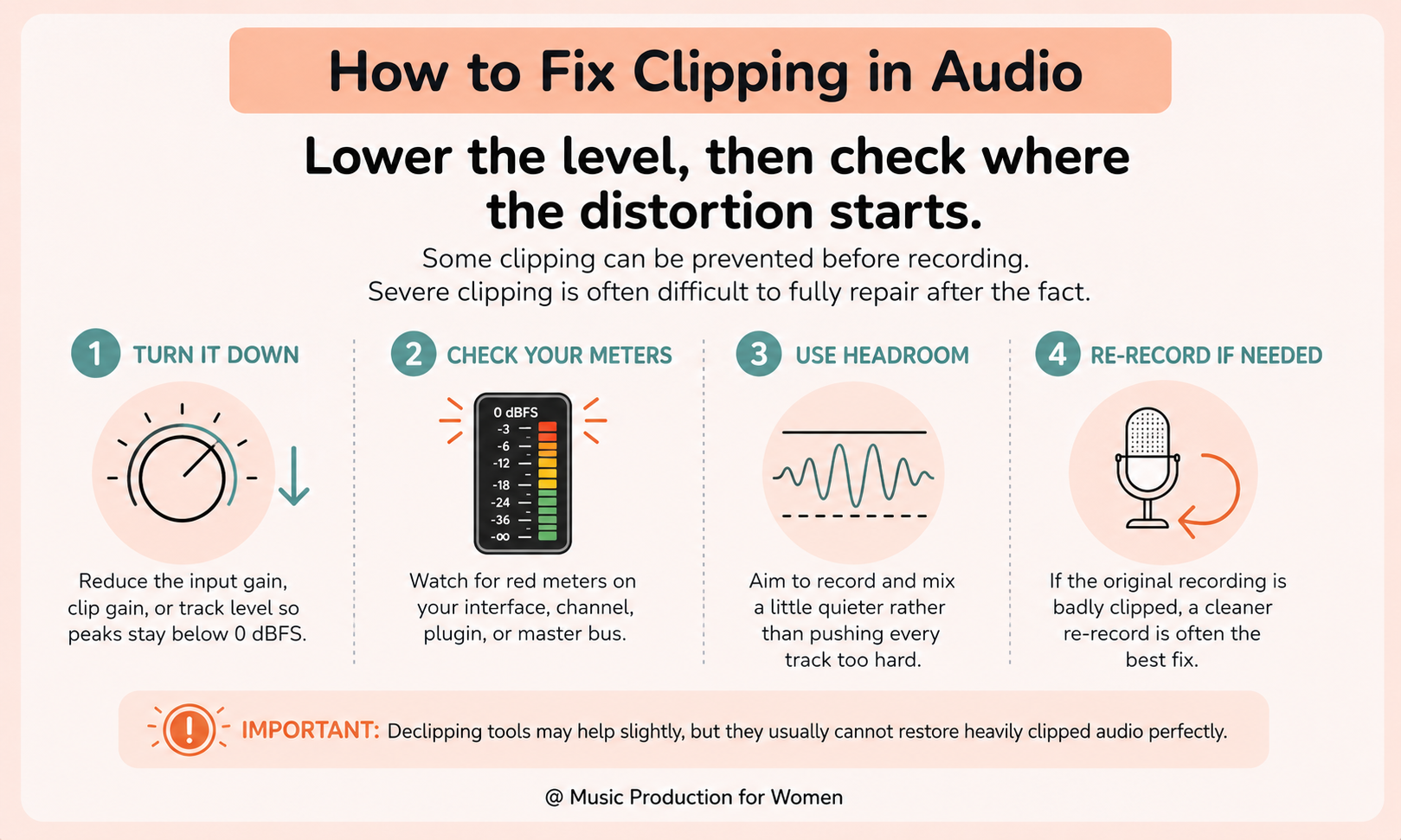
1. Turn down the input gain
If the clipping is happening in real time while you are recording, reach for your audio interface, lower the gain knob, and simply record the take again.
2. Lower the clip gain or track volume
If the audio file itself isn’t permanently damaged, just reduce the clip gain (the actual volume of the audio region) or pull down the track fader in your DAW.
3. Check your plugins
Bypass your plugins one by one and watch your meters. If the clipping magically stops when you turn off a specific EQ or compressor, that plugin is adding too much gain. Just reduce the plugin’s output gain and check the level again.
4. Lower your bus or group levels
If you have several tracks routed to a single bus, check that bus meter too. For example, your individual drum tracks might be totally fine, but your combined drum bus could still overload and clip.
5. Leave headroom on the master
Your master channel absolutely does not need to sit dangerously close to 0 dB while you are mixing. Pull your faders down and leave some space so the mix can actually breathe.
6. Re-record if the audio is already clipped
Here is the tough love: if the clipping was recorded directly into the audio file, lowering the volume later will not fully fix the distortion. It will only give you quieter distortion. In that case, the cleanest, most professional solution is to swallow your pride and re-record it at a safer level.
Audio Clipping Examples
Let’s paint a picture. Imagine you’re recording a vocalist. The quiet, breathy verses sound smooth and controlled. But when the bridge hits and they belt out a louder note, the track meter suddenly reaches the top of the channel and turns red. When you play it back, that powerful vocal moment sounds harsh, crackly, and distorted. That is a clear example of audio clipping on a single track.
Clipping can also happen across your entire mix. Your drums, bass, synths, and vocals might sound clean when you solo them individually. But when the chorus comes in and every element plays at the same time, all those signals combine and your master channel can overload.
This means the full mix is simply too loud, even if the individual parts sounded fine on their own. Check out the example below:
Clean vocal example
The vocal is recorded at a safer level, so it stays clear and controlled.
Clipped vocal example
The vocal level is too high, causing harsh distortion.
Vocals from You Know Me Better by Xylo Aria
How to Prevent Audio Clipping While Recording
The best way to deal with clipping is to prevent it before it happens.
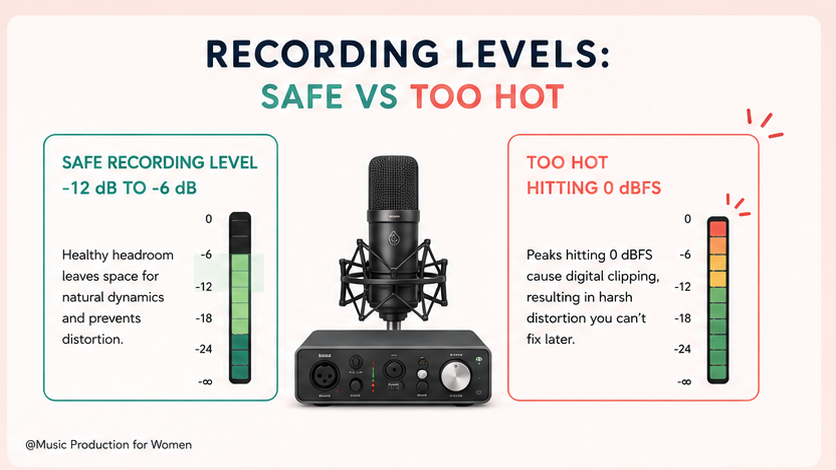
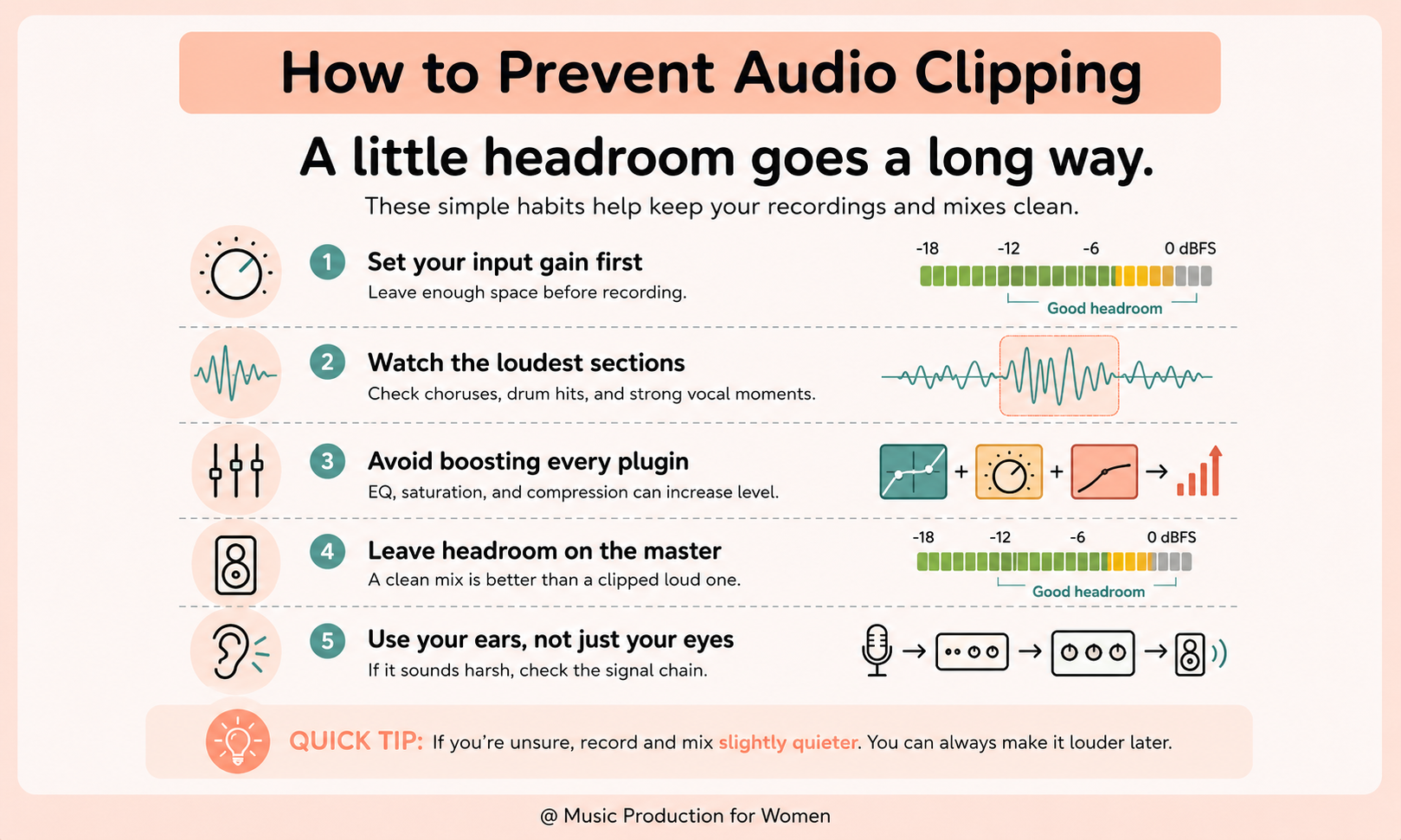
When recording vocals or instruments, leave enough headroom so the loudest parts of the performance do not hit 0 dBFS or push your audio interface into the red. A simple bit of gain staging at the start can help you capture a clean signal before it reaches your DAW.
When recording vocals or instruments:
Do a test recording first
Ask the performer to sing or play the loudest section
Avoid red lights on your audio interface
Aim for recording peaks around -12 dB to -6 dB
Ask the vocalist to move slightly back from the microphone on louder parts
Don’t record too hot just because it sounds louder
A good rule to remember: it is better to record a little quieter and turn the sound up later than to record too loud and permanently clip the audio.
How to Prevent Audio Clipping While Mixing
Mixing is about balance, not just volume.
To avoid clipping while mixing, keep an eye on your levels at every stage of the signal chain: individual tracks, plugins, buses, and the master channel. This is where gain staging helps you keep your mix clean, controlled, and easier to master later.
To avoid clipping while mixing:
Start with lower fader levels
Avoid pushing every track louder
Turn other instruments down if one part needs more space
Check plugin output gain
Watch your bus and master meters
Use limiters carefully
A clean mix does not need to be extremely loud while you are mixing. It needs space, balance, and headroom. Loudness can come later during mastering.
Want to Start Producing But Not Sure Where to Start?
Final Thoughts
I still remember finally taking that crushed mix of mine to a professional mixing engineer. I was terrified I had ruined the song forever. But within ten minutes, he just pulled back the faders, fixed the gain staging, and magically, all the parts that were violently clipping just slid right back into place. It was a massive Aha! moment for me.
The truth is, audio clipping is actually one of the easiest problems to avoid once you understand what causes it.
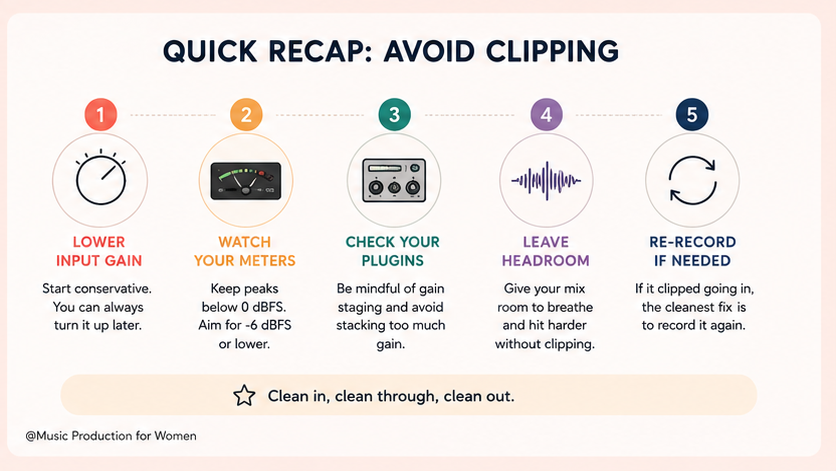
If your audio ever sounds inexplicably harsh, crackly, or distorted, don’t panic. Just check your levels. Look at your audio interface input gain, your individual track meters, your plugin outputs, your drum buses, and your master channel.
The main rule to live by is incredibly simple: don’t push everything into the red. Leave some headroom, keep your gain staging clean, and your recordings and mixes will instantly sound more controlled and professional.
I really hope this guide saves you a humbling trip to a professional mixing engineer—or at the very least, spares you from the terrifying jump-scare of a blown-out mix during your next car test. Keep your levels clean, and happy mixing!
FAQs
What does clipping mean in audio?
Clipping in audio means a signal is too loud and exceeds the maximum level your system can handle, cutting off the waveform peaks and creating distortion.
How do you fix clipping in audio?
To fix clipping in audio, lower the input gain, reduce clip or track volume, check plugin output levels, and leave headroom. If the audio was clipped while recording, re-record it at a lower level.
What is a clipping sound?
A clipping sound is usually harsh, crackly, crunchy, fuzzy, or distorted, especially on loud peaks like vocals, drums, bass drops, or choruses.
Is clipping the same as peaking?
No. Peaking means the signal is reaching a high level. Clipping means the signal has exceeded the maximum level and is distorting.
Is audio clipping bad?
Accidental audio clipping is usually bad because it creates harsh distortion. However, saturation, distortion, or clipping plugins can be used creatively.
What causes audio clipping?
Audio clipping is caused by a signal being too loud, often from high input gain, loud track faders, plugin gain, bus levels, or master channel clipping.
Reference List
Owsinski, B. (2017). The Mixing Engineer’s Handbook. Bobby Owsinski Media Group.
Izhaki, R. (2018). Mixing Audio: Concepts, Practices and Tools. Focal Press.
Senior, M. (2011). Mixing Secrets for the Small Studio. Focal Press.
White, P. (2000). Basic Mixers. Sanctuary Publishing.