Parallel Processing in Music Production: Beginner Guide
Table of Contents
What Is Parallel Processing in Music Production?
How Return Tracks and Sends Work
How to Set Up Parallel Reverb Without Making a Mess
Key Takeaways
Parallel processing lets you blend a clean dry signal with a separately processed wet signal.
Serial processing places effects directly on the track, while parallel processing sends a copy of your audio to a separate path.
Return tracks, aux tracks, buses, and sends are commonly used to create parallel processing in a DAW.
Parallel processing helps keep vocals clear and upfront while still adding space, width, emotion, or energy.
For reverb and delay returns, the golden rule is to set the effect plugin to 100% wet.

What Is Parallel Processing in Music Production?
Ever made a good espresso too sweet by adding sugar directly into the cup?
Once it dissolves, you can’t really take it back. The original flavour is still there, but it has been changed completely.
Mixing audio can work in a similar way.
If you place a huge reverb directly onto a clean vocal track, the vocal itself starts to change. It may feel bigger for a moment, but it can also become blurry, distant, and harder to understand.
That’s where parallel processing comes in.
Parallel processing is a mixing technique where you blend your original dry signal with a separately processed version of that same sound.
Instead of changing the original track directly, you create a second path for the audio. One path stays clean and dry, like the espresso before anything is added. The other path carries the effect, such as reverb, delay, compression, saturation, or distortion.
Then, you blend the two together to taste.
This means you can keep your lead vocal clear, intimate, and upfront while adding a separate reverb signal behind it to create space and emotion.
The result is a mix that retains clarity and presence, while also feeling wider, deeper, and more polished.
Serial vs Parallel Processing
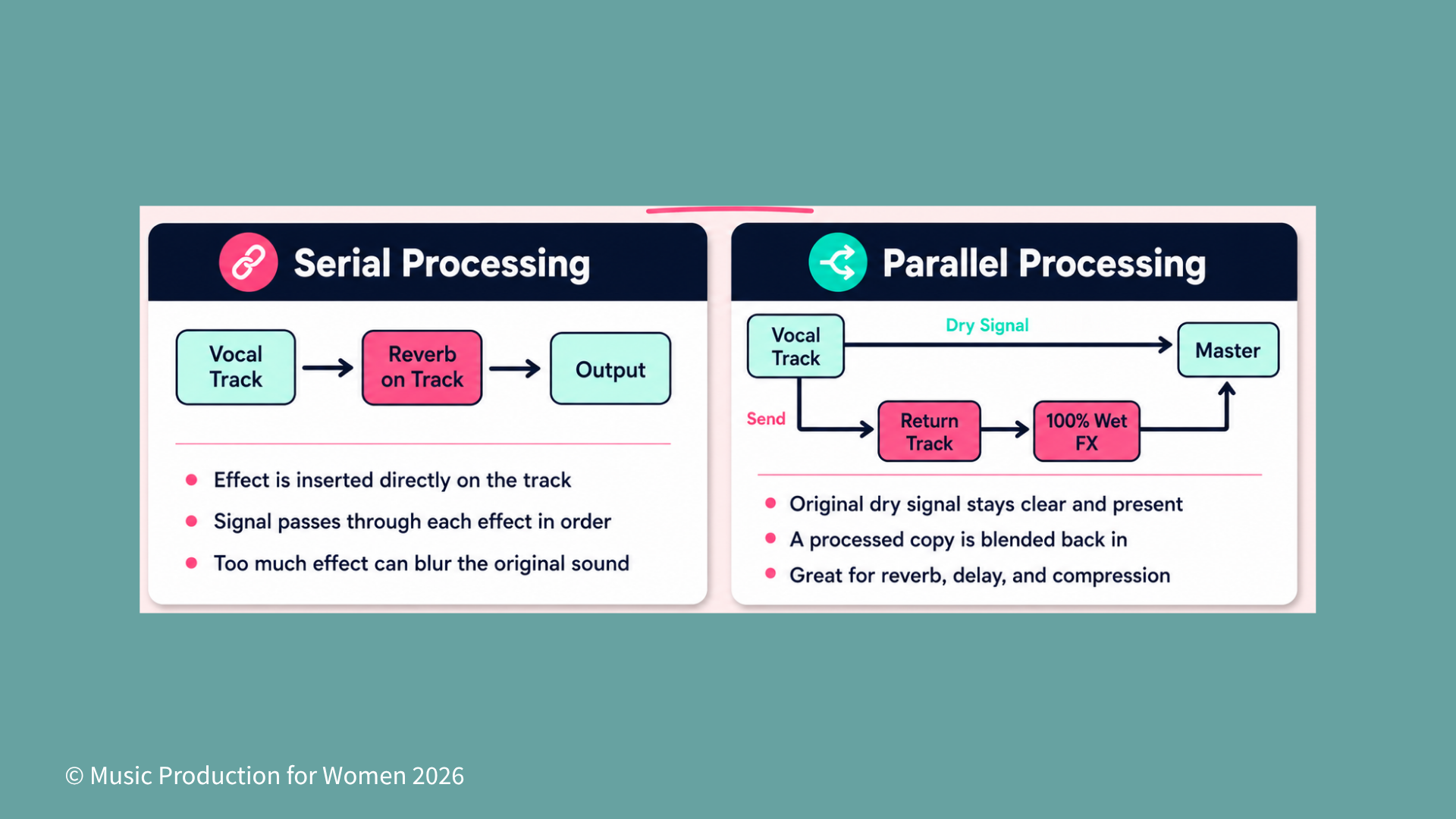
There are two common ways to add effects in music production: serial processing and parallel processing.
Serial Processing
Serial processing means placing effects directly onto a track, one after the other.
For example, your vocal chain might look like this:
Vocal → EQ → Compressor → Reverb → Output
In this setup, the signal flows through each effect in order:
The EQ shapes the vocal first.
The compressor reacts to the EQ’d vocal.
The reverb is added after everything that came before it.
This is a very common way to build an effect chain, especially for tools like EQ, de-essing, and compression.
However, when you place effects directly on the track, they become part of the main sound. This means that if you add too much reverb, delay, saturation, or distortion, the original signal can start to lose clarity.
The easy way to remember it:
Serial processing changes the sound directly.
Each effect affects what comes after it.
It is useful, but too much processing can make a track feel muddy or overworked.
Parallel Processing
Parallel processing works differently.
Instead of placing the effect directly on the track, you send a copy of the sound to another track, usually called a return track, aux track, or bus, depending on your DAW.
For Ableton users, the official Ableton Live routing and I/O manual is a useful reference for understanding how tracks, returns, and routing work.
For Logic Pro users, Apple’s guide on how to route audio via send effects in Logic Pro explains how sends can route part of a signal through a bus to an aux channel.
For example:
Dry Vocal → Output
Dry Vocal → Send → Reverb Return → Output
Now you have two versions of the vocal playing at the same time:
The original dry vocal stays clear and upfront.
The processed version adds space, movement, thickness, or character.
You can blend in as much of the effect as you want without replacing the original sound.
The easy way to remember it:
Serial processing changes the sound directly.
Parallel processing blends the original sound with an effected copy.
Why Use Parallel Processing?
Parallel processing gives you more control over your mix because it lets you add effects without losing the strength of the original sound.
1. Glue Your Mix Together and Save CPU
Instead of adding a separate reverb plugin to every vocal layer, you can create one reverb return and send multiple vocals to it.
This saves CPU because your DAW only needs to run one reverb plugin instead of several. It can also help your mix feel more cohesive, because your vocals are sharing the same sense of space.
For example, your lead vocal, backing vocals, and ad-libs can all be sent to the same reverb return. Each track can have a different send amount, but they still feel like they belong in the same world.
2. Keep the Dry Signal Front and Center
Effects like reverb and delay can add space, emotion, and movement, but too much of them can push a sound further back in the mix.
Parallel processing helps you avoid that.
Your dry vocal stays clear and upfront, while the reverb or delay sits around it. This means you can add atmosphere without making the vocal blurry, distant, or hard to understand.
3. Process the Effect Separately
One of the biggest advantages of parallel processing is that you can treat the effect separately from the original sound.
For example, reverb can quickly build up muddy low-mid frequencies. By placing the reverb on a return track, you can add an EQ after the reverb and clean it up without changing the original vocal.
You can also filter, compress, widen, distort, or automate the effect on its own. The dry signal stays safe, while the processed signal gives you extra colour, space, and character.
How Return Tracks and Sends Work
Return tracks and sends are the ultimate duo for parallel processing.
The names change slightly depending on your software. In Ableton Live, they are usually called Return Tracks and Sends. In Logic Pro or Pro Tools, you will often hear people talk about Buses and Aux Tracks. Don’t let the jargon confuse you — it is the same basic concept.
For Ableton users, the official Ableton Live routing and I/O manual is a useful reference for understanding how routing works inside Live.
For Logic Pro users, Apple’s guide on how to route audio via send effects in Logic Pro explains how sends can route part of a signal through a bus to an aux channel.
But what exactly is an Aux Track?
Aux is short for Auxiliary channel. To keep it simple: normal audio tracks are where your actual recordings live, such as waveforms, loops, and MIDI clips on your screen. An Aux track is different. It does not hold recorded clips, loops, or MIDI blocks.
Instead, think of it as a dedicated effects room inside your mixer. Its job is to host an effect plugin, such as a large reverb, and wait for you to route audio into it.
So, here is how the routing works:
The Return/Aux Track is the separate mixer channel where you load your effect plugin.
The Send is the control on your original track that decides how much signal gets sent to that return or aux track.
For example, you create an Aux Track and add reverb to it. Then, on your lead vocal track, you slowly turn up the Send knob. The more you increase the send, the more vocal gets sent into that reverb space.
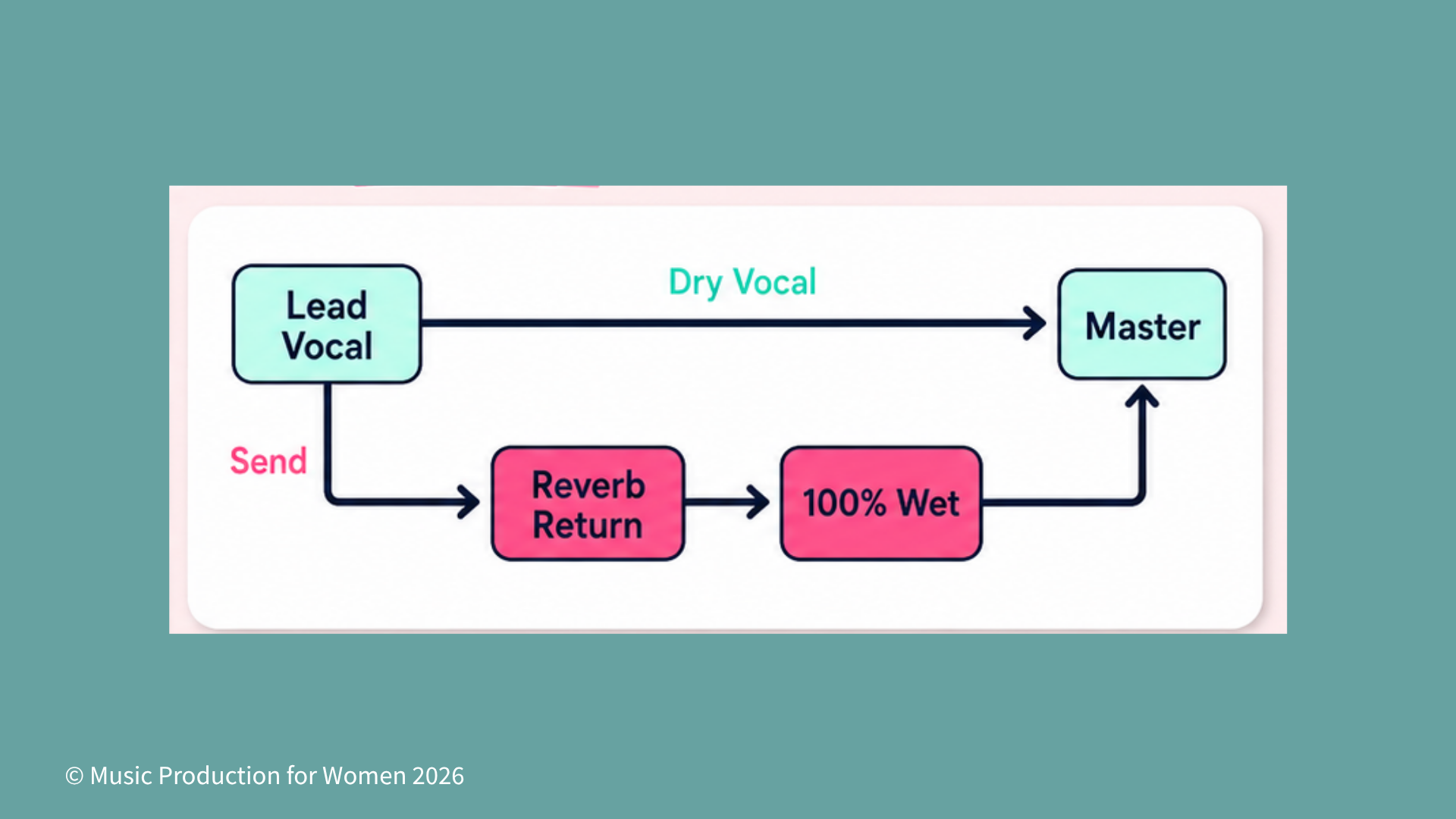
Your original vocal is still playing from its own track, while the Aux track plays the wet reverb version alongside it.
This dual-path setup is why Aux/Return tracks are useful for effects like:
Reverb and delay
Chorus
Distortion and saturation
The golden rule: when you use reverb or delay on a Return/Aux track, set the plugin’s mix control to 100% wet.
Why? Because your original track is already providing clean, dry audio. The Aux track’s job is only to provide the wet effect. Set it to 100% wet, then use your Send knob to control how much effect you want.

Check out our Podcast Episode
How to Set Up Parallel Reverb
Here is a simple beginner workflow for setting up parallel reverb on vocals.
1. Create the Return Track
Create a new return track, aux track, or bus in your DAW.
Add your favourite reverb plugin to it. A short room can make the vocal feel intimate and natural, while a plate reverb can make it feel classic, wide, and polished.
2. Set the Reverb to 100% Wet
Turn the dry/wet control inside the reverb plugin all the way to 100% wet.
This is important because your original vocal track is already providing the dry signal. If the return track also contains dry signal, you may accidentally make the vocal louder or create phase issues, depending on your routing and plugin.
3. Dial in the Send Slowly
While listening to the full mix, slowly increase the send amount on your vocal track.
Try not to set your reverb while listening to the vocal in solo. A reverb that sounds perfect in solo can easily become too much once the drums, bass, and other instruments come back in. A good trick is to turn the send up until you clearly feel the space, then pull it back slightly.
4. EQ the Reverb Return
If your vocal starts to sound cloudy after adding reverb, the problem is often the reverb return, not the vocal.
Add an EQ after the reverb on the return track. Try cutting some low-end rumble and reducing any harsh high frequencies.
This lets your vocal stay clear while the reverb becomes cleaner and more controlled.
Pro tip: You do not need a different reverb for every single element in your track. You can send multiple synths, guitars, backing vocals, or ad-libs to the same reverb return. Sharing the same acoustic space can help glue your mix together.
Want to Start Producing But Not Sure Where to Start?

Final Thoughts
Parallel processing is a simple way to make your mix feel more polished without losing the strength of the original sound.
Instead of forcing one track to do everything, you create two paths:
One clean, dry path.
One processed, effected path.
For beginners, start by practicing with parallel vocal reverb. Once you understand that send-and-return workflow, you can use the same idea for parallel distortion, parallel compression, chorus, delay, and other creative effects.
You keep your original sound punchy and clear, while adding the space, width, colour, and character underneath it.
FAQ
References & Further Reading
Ableton Live Manual: Routing and I/O Ableton Live Manual: Mixing and Return Tracks
Apple Logic Pro: Route Audio via Send Effects
Sound On Sound: Logic Pro Sends, Buses & Auxes
Owsinski, Bobby. The Mixing Engineer’s Handbook.
Izhaki, Roey. Mixing Audio: Concepts, Practices and Tools.
MPW, Logic Pro Buses Explained for Beginners: Sends, Aux Tracks and Reverb Buses