MIDI Controller Explained: What It Is & Do You Need One?
Table of Contents
MIDI vs Audio: What’s the Difference?
What Information Does MIDI Contain?
What Does Velocity Mean in MIDI?
Why Is MIDI Useful for Beginners?
Do You Need a MIDI Keyboard to Use MIDI?
Can a Beginner Use a MIDI Keyboard?
What Are the Disadvantages of a MIDI Keyboard?
Key Takeaways
MIDI stands for Musical Instrument Digital Interface (a very dramatic name for a wonderfully simple concept!).
MIDI is not audio. It is simply your digital musical instruction data, like a digital sheet of music.
MIDI is a universal language. It translates your musical actions into data your DAW and virtual instruments can actually understand.
MIDI is 100% silent on its own. It always needs a sound source (like a virtual piano or synth) to actually be heard.
MIDI holds all the musical details. It controls which notes play, your timing, note length, velocity, and even knob movements.
Velocity is the secret to humanizing your track. It describes how hard or soft a note is played, usually on a numerical scale from 1 to 127.
You absolutely do not need a MIDI keyboard to use MIDI. You can happily just draw notes straight into your DAW with your mouse!
MIDI gives you the ultimate superpower of flexibility. You can easily fix mistakes, change your timing, or completely swap instruments long after you've hit record.
I still remember the first time I opened Logic at college. I was sitting in a massive tech lab, surrounded by shiny computers, music software, and a small piano-style keyboard I would later learn was a MIDI keyboard.
I pressed play, expecting to hear something impressive.
Instead: silence.
On the screen, tiny colorful rectangles sat inside the piano roll, but they made no sound. I remember thinking: Wait… are those little square notes? And why are they silent?
That was my first real encounter with MIDI.
The word MIDI can sound technical at first, but the main idea is simple: MIDI is not audio. MIDI is musical instruction data.
It tells your software or instruments which note to play, when to play it, how long to hold it, and how hard or soft it should feel.
Think of MIDI like an interpreter in the studio. Your MIDI keyboard, synth, computer, and DAW might all come from different “countries”, but MIDI helps them understand each other. It translates your musical actions into information your computer can read.
Yes girl, we’re basically translating music into code.
What Is MIDI?
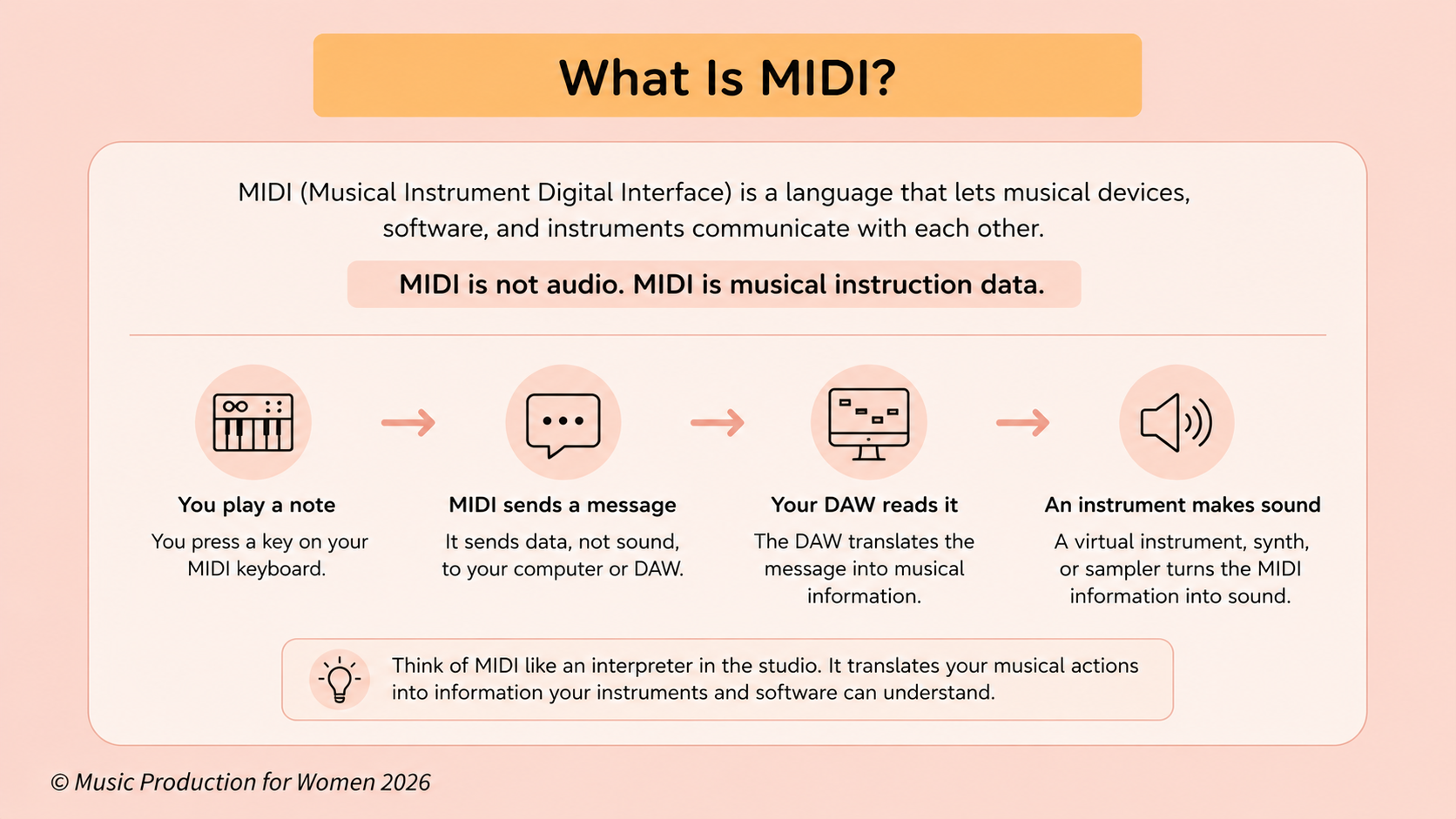
Think of MIDI as the ultimate translator at a very chaotic international party. It’s the universal language that allows your musical devices, software, and instruments to happily chat with each other instead of staring blankly across the desk.
In everyday music production, you'll mostly use MIDI inside your DAW to control your virtual instruments. We’re talking lush pianos, gritty synths, booming drums, funky basses, soaring strings, samplers—you name it, MIDI can control it.
A really helpful way to picture it is this: MIDI is the interpreter between your musical idea and your computer.
When you passionately press a key on a MIDI keyboard, that keyboard does not send an actual sound into your DAW. Instead, it sends a quick digital text message. MIDI translates your physical action into data your software can actually understand, basically saying: "Hey! Play this note right now, hit it exactly this hard, and hold it for this long, please!"
But let's bring it back to our golden rule: MIDI is not the sound itself. It is strictly the instruction manual telling a sound source what to do.
So, if you draw a beautiful little MIDI note into your DAW, that note will sit there in complete, awkward silence. It desperately needs an instrument—like a software piano, a wild synth, a sampler, or a drum rack—to actually read that instruction and turn it into glorious sound.
To sum it up: MIDI translates the instruction. The instrument creates the sound.
What Does MIDI Stand For?
MIDI stands for Musical Instrument Digital Interface.
I know, it’s a very dramatic name. It sounds like a piece of highly classified sci-fi hardware. But the concept is actually incredibly friendly. It just means that MIDI was created so that your electronic instruments, computers, and music software could finally communicate with each other.
Without MIDI, your fancy new synth, your keyboard, your drum machine, and your DAW would all be speaking completely different languages. They would just sit on your desk, staring at each other in awkward silence. MIDI gives them a shared, universal language.
To put it simply, MIDI is the language that lets your software and musical devices communicate.
MIDI vs Audio: What’s the Difference?
One of the biggest hurdles for beginners is wrapping their heads around the difference between MIDI and audio. But once you get it, it’s a total game-changer.
Let's say it again together: MIDI is not audio!
Audio is actual, captured sound. If I put a microphone in front of my ukulele and start singing, or if I record my shiny new Volcano Bass hardware synth, I am creating an actual sound wave. That’s audio. It’s a bit like baking a cake, once it’s baked, it’s pretty hard to un-bake a wrong ingredient out of it!
MIDI is completely different. MIDI is not a sound wave; it is information. If audio is the final baked cake, MIDI is just the recipe card. It is the script that tells your virtual instrument exactly what to play, but it doesn't make a single peep on its own.
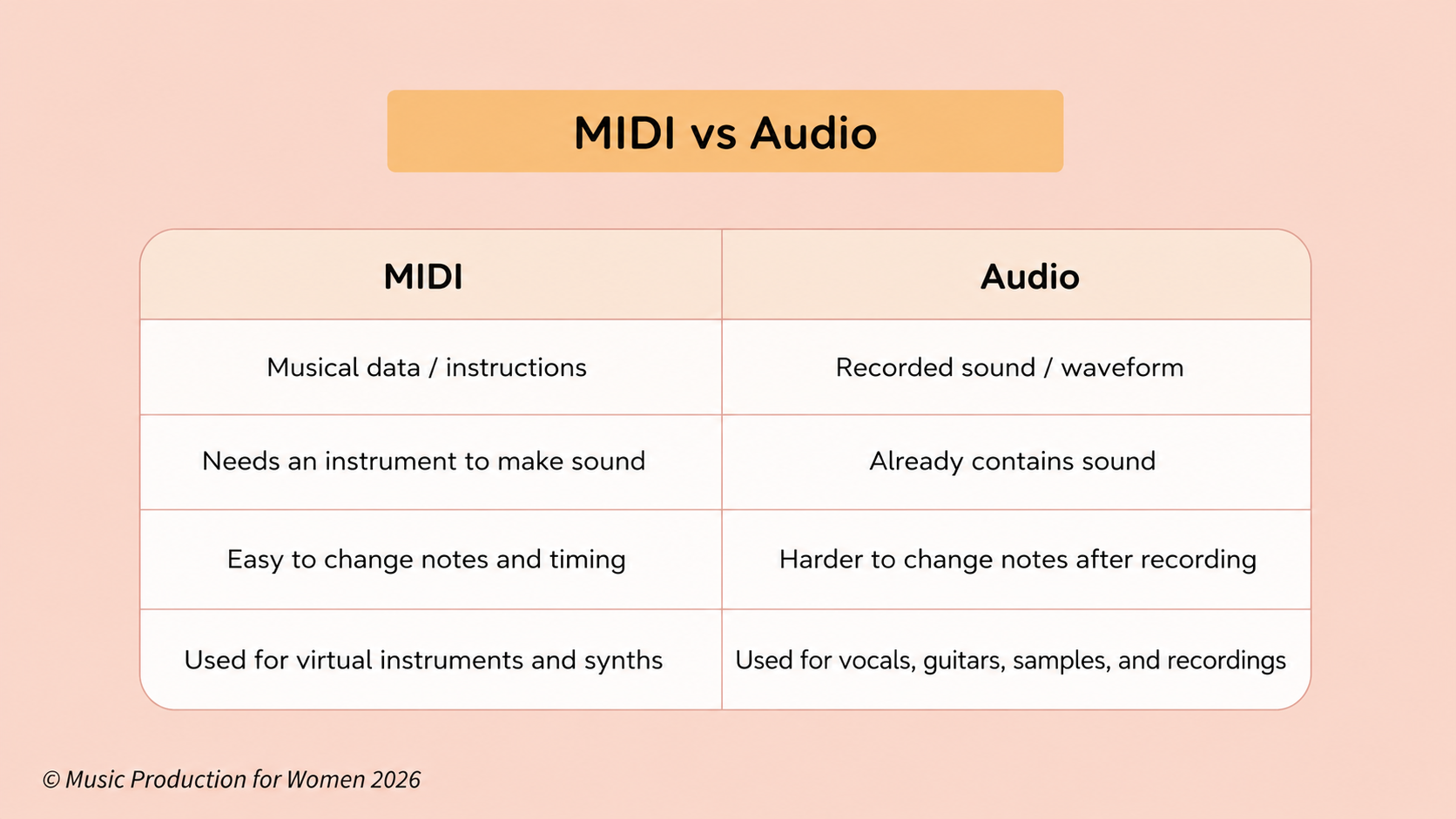
This is exactly why MIDI is so incredibly useful and hilariously forgiving. Did you play a spectacularly wrong note? No need to panic or re-record—just click and drag it to the right one! Is your timing a little bit messy? Just gently nudge the notes right onto the beat. Hate the piano sound you originally chose? You can swap it for a massive synthesizer with a single click.
While you can edit audio, MIDI is your absolute best friend when you want the ultimate freedom to fix mistakes, change your mind, and reshape your ideas with zero stress.
What Information Does MIDI Contain?
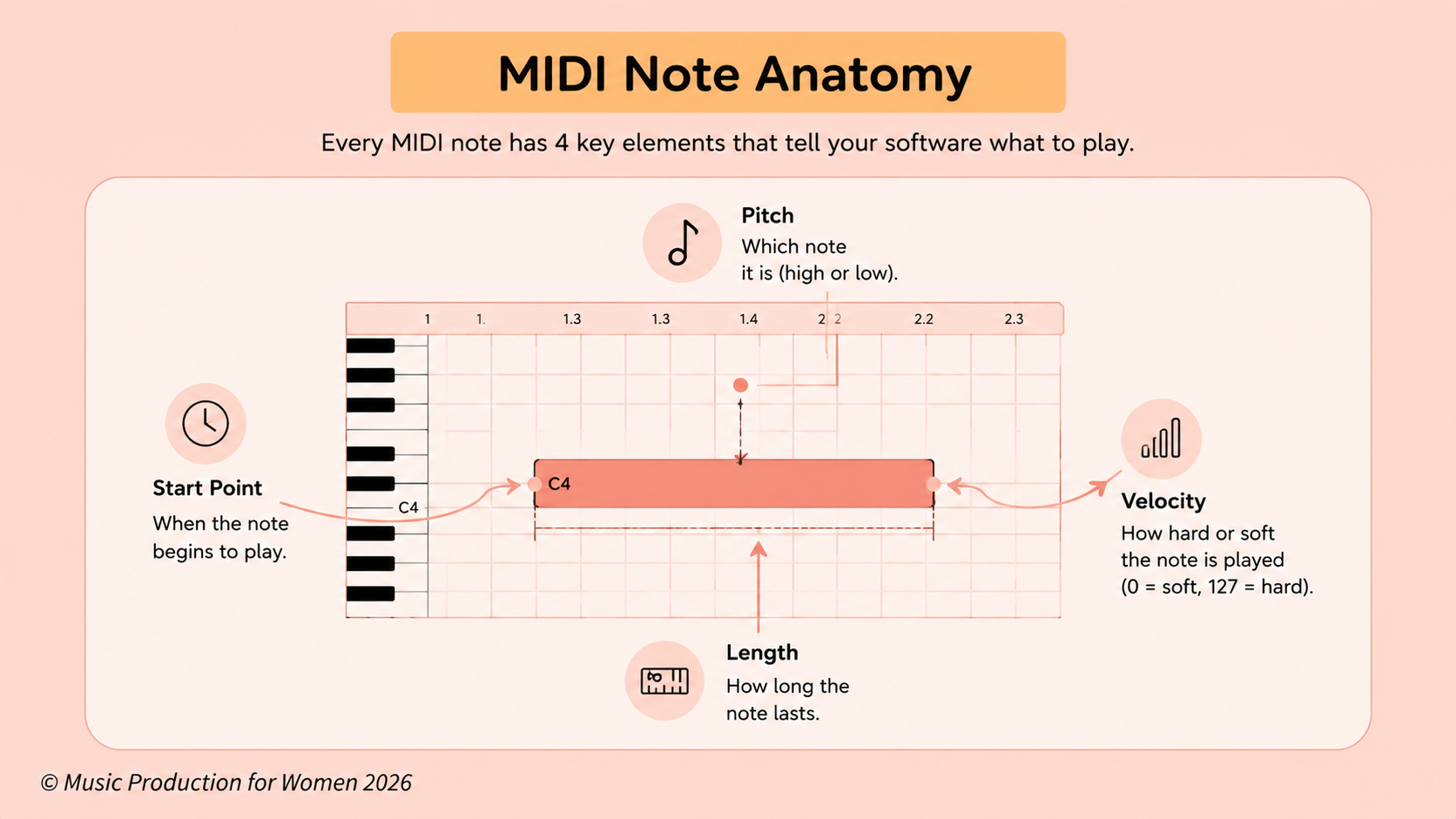
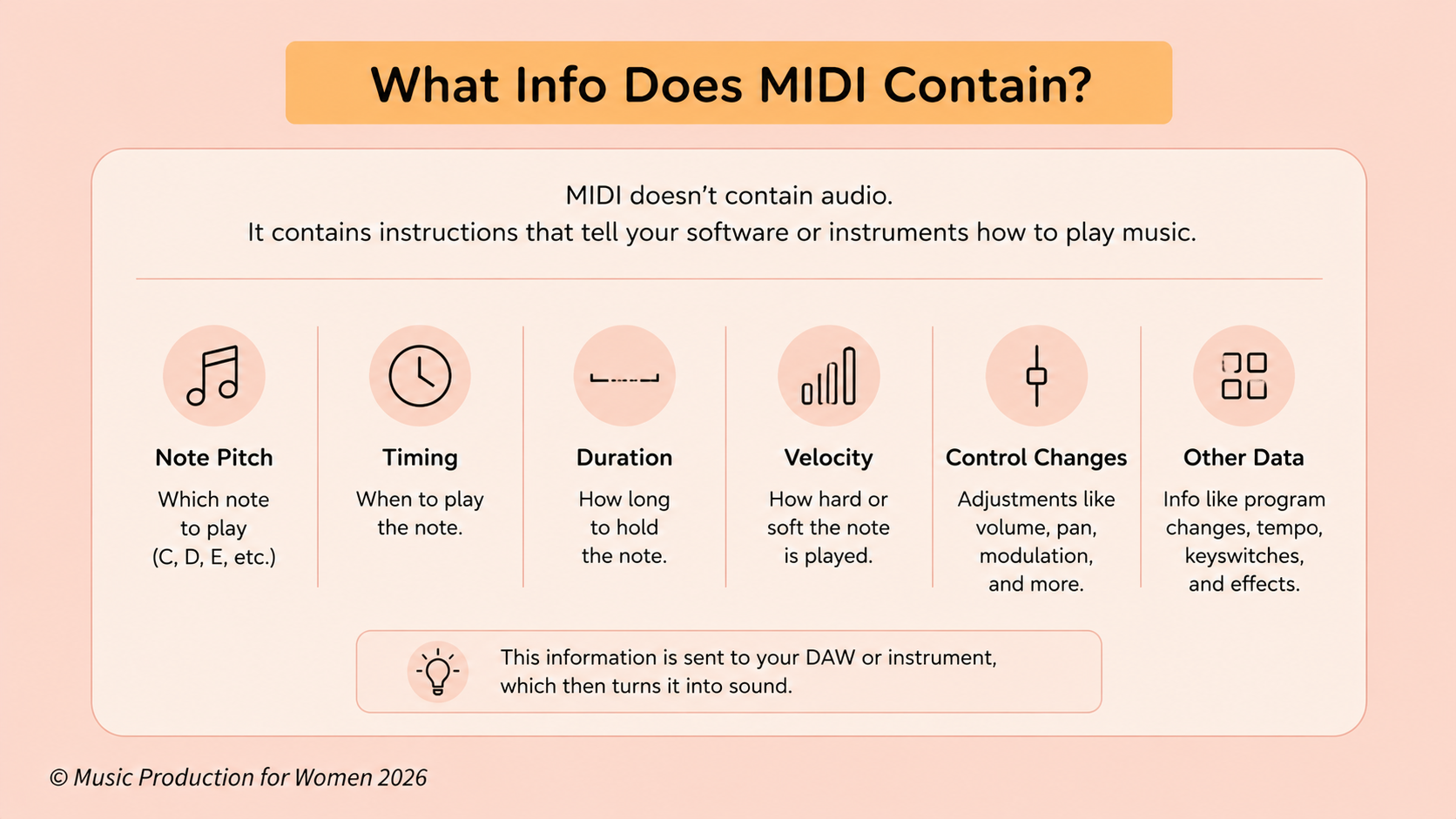
When you record a MIDI clip, you aren't just putting random squares on a grid, you are actually sending a massive amount of musical information packed into a tiny file. MIDI tells your DAW or virtual instrument everything it needs to know, such as:
Which note to play (Are we going for a moody low C or a squeaky high E?)
When the note starts (Because timing is everything!)
How long the note lasts (Don't let go yet!)
How hard or soft the note is played (This is known as velocity)
Which controller movements happen (Like twisting knobs, sliding faders, wild pitch bending, or stepping on a virtual sustain pedal)
A really handy piece of producer trivia to keep in your back pocket is that a lot of MIDI values operate on a numerical scale from 0 to 127.
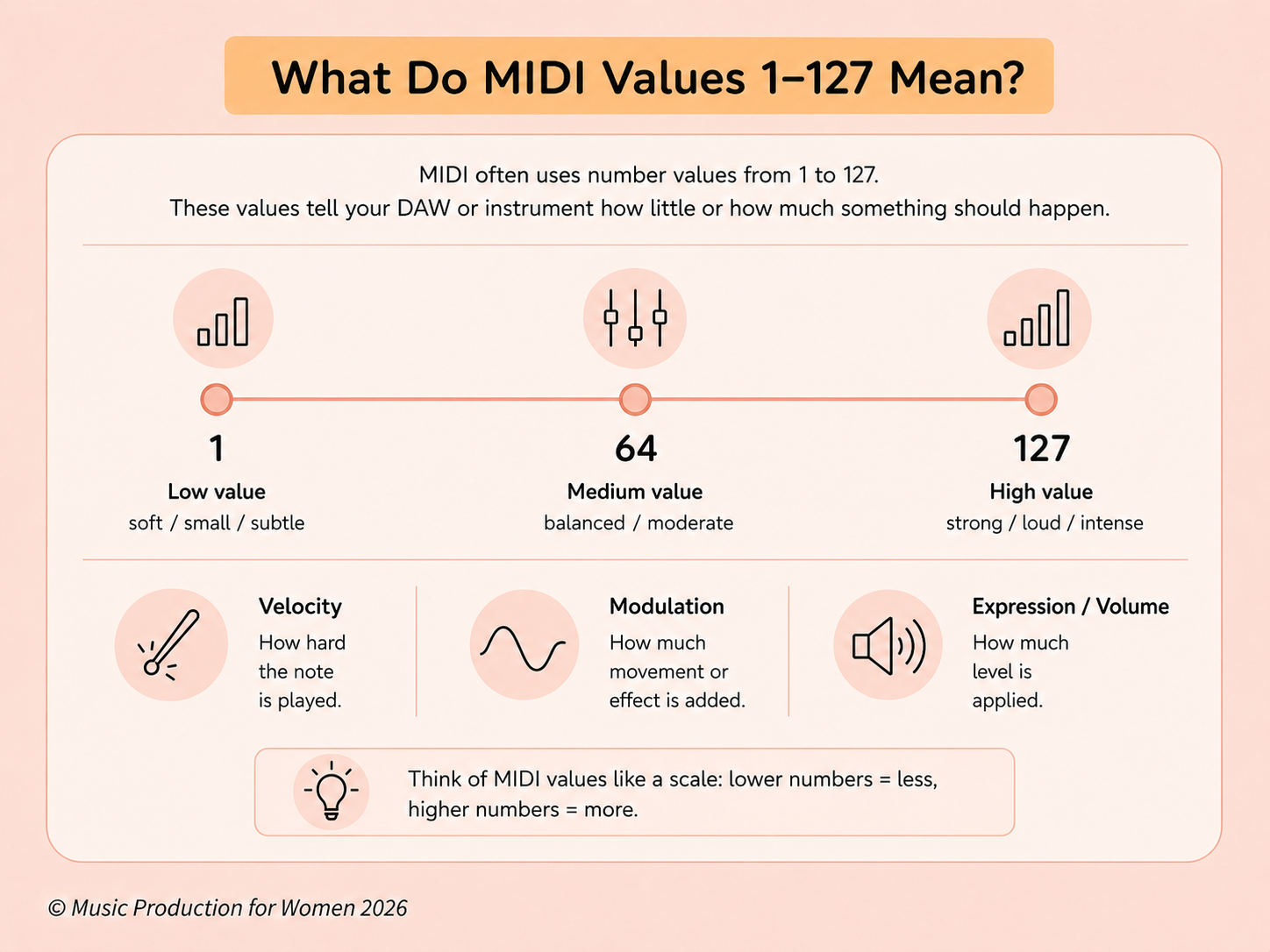
Take velocity, for example, which is typically displayed as a value between 1 and 127. If your velocity is low, the note will sound soft, gentle, and sweet. If you crank it all the way up to 127, your virtual instrument is going to play that note as if it owes you something!
MIDI isn't just about translating the basic words. It is translating all the emotion and expression behind them, basically saying to your computer, “Hey, play this softly, hit this one way harder, and hoooold this one just a little bit longer!”
What Is a MIDI Signal?
If you connect physical gear, you may hear the term MIDI signal.
A MIDI signal is not a sound signal. It is a data signal.
When you press a key on a MIDI keyboard, your computer does not receive a recording of that sound. It receives translated information, like:
“Play this note now.”
“Play this note softly.”
“Move this controller value.”
A MIDI signal can travel through USB, MIDI cables, or inside your DAW.
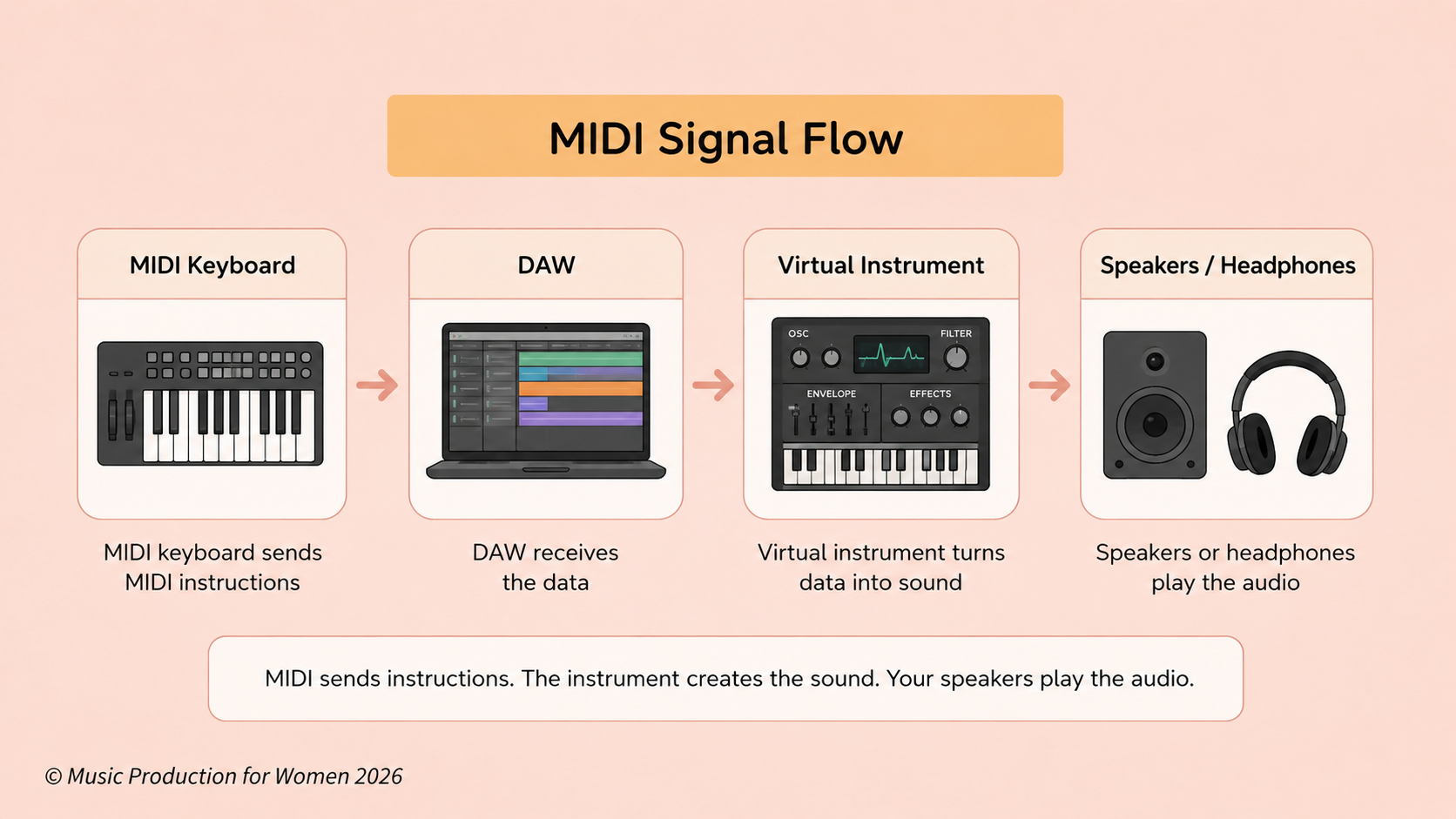
Basically, the MIDI signal is the message. The sound source is the voice that speaks it out loud.
What Are MIDI Instruments?
Simply put, MIDI instruments are any instruments that can read and respond to MIDI data. They can live inside your laptop as software or sit on your desk as physical gear.
Some quick examples include:
Software synths & virtual pianos
Drum racks & samplers
Massive orchestral libraries
Hardware synths & drum machines
Here is a super important distinction to remember: A MIDI instrument actually makes the sound. A MIDI controller, however, is basically just a fancy remote control.
For example, a standard MIDI keyboard controller usually doesn't have any built-in sounds. It simply sends that digital text message to your DAW, and your DAW uses that info to play a virtual instrument.
Want to dive a little deeper without getting a headache? Check out our quick guide: what is a MIDI controller?
What Does Velocity Mean in MIDI?
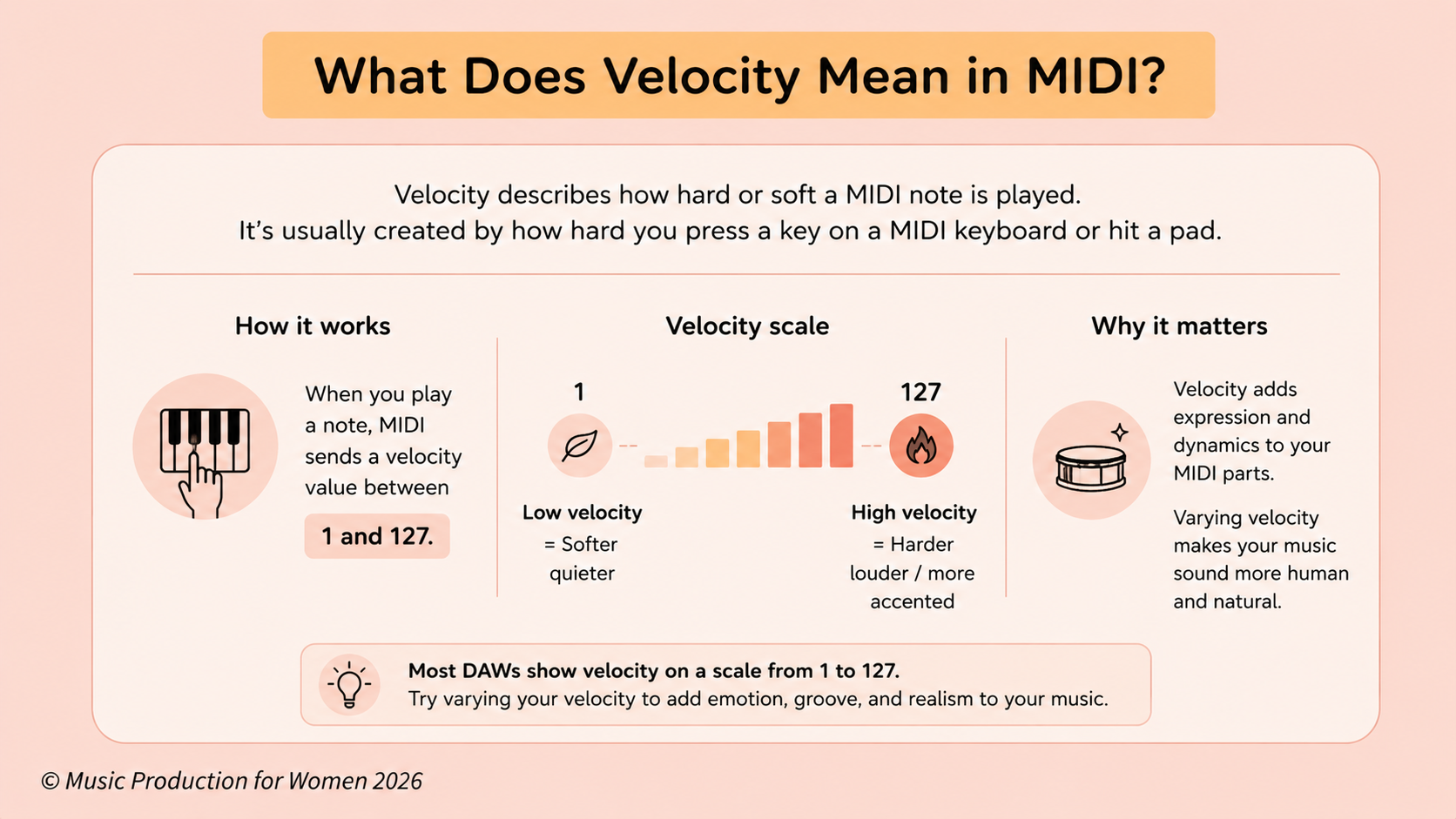
Velocity simply describes how hard or soft a MIDI note is played, usually on a scale from 1 to 127.
If you smash a key on your MIDI keyboard, you get a high velocity (loud, bright, and aggressive). Tap it gently, and you get a low velocity (soft and sweet).
This is the absolute secret to making MIDI sound human. If every single note hits at exactly 127, your track is going to sound like a robotic typewriter! By simply varying the velocity, your drums, chords, and melodies will instantly feel much more natural, bouncy, and alive.
Why Is MIDI Useful for Beginners?
MIDI is your absolute best friend in the studio because it gives you the ultimate superpower: total flexibility.
Let’s say you record a melody but totally botch a note. No need to panic! With MIDI, you just grab that rogue note with your mouse and drag it where it belongs. If your timing is a bit wobbly, just nudge the notes onto the beat. If that piano sound isn't working for the track anymore, swap it for a massive synth with a single click.
With MIDI, you have total control to instantly change:
Pitch & Timing
Note length & Velocity
The actual instrument making the sound
This is exactly why MIDI takes all the pressure off. You don't need to be a flawless concert pianist on the first try. You can simply get your musical ideas down first and fix the performance later!
Do Musicians Still Use MIDI?
Yes, musicians still use MIDI all the time.
Even though MIDI was created in the 1980s, it is still one of the most important tools in modern music production.
Producers, composers, songwriters, film scorers, electronic artists, live performers, and beatmakers use MIDI every day.
You will find MIDI in DAWs, virtual instruments, MIDI keyboards, drum machines, hardware synths, film scoring templates, and live performance setups.
MIDI is still used because it is flexible, reliable, and universal.
In other words, this interpreter is still very much employed.
Do You Need a MIDI Keyboard to Use MIDI?
No, you do not need a MIDI keyboard to use MIDI.
You can draw MIDI notes directly into your DAW using the piano roll or MIDI editor.
A MIDI keyboard is just one way of sending the message. It is like speaking to the interpreter by pressing keys. But you can also “write the message down” directly in your DAW by drawing MIDI notes into the piano roll.
A MIDI keyboard can speed up the process and make it more expressive, but it is not required.
A MIDI keyboard can speed up the process and make it more expressive, but it is not required. If you’re figuring out what gear you actually need before buying anything, check out our guide to home recording studio setup costs.
Can a Beginner Use a MIDI Keyboard?
Yes, 100%! You absolutely do not need to be a classically trained concert pianist (or even know how to read sheet music) to use a MIDI keyboard. No Mozart skills required!
You can use a MIDI keyboard just to tap out simple little melodies, test out a bassline, smash some drum pads, or simply mess around with fun virtual instruments to see what sounds good.
Even if you are literally just poking one key at a time with your index finger, that is a perfect way to start. Remember our golden rule of flexibility? You can always jump into the piano roll afterward to fix your timing, nudge your notes around, and pretend you played the whole thing flawlessly on the first take!
Honestly, a cute, compact 25-key keyboard is usually more than enough to get you started without taking over your entire desk.
Check out our Music Tutorial Playlist on YouTube.
What Are the Disadvantages of a MIDI Keyboard?
While a MIDI keyboard is a fantastic tool, it is absolutely not mandatory.
The biggest "catch" (and the thing that trips up most beginners) is that most MIDI keyboards do not make a single sound on their own. If you set one up without your computer and a DAW, it’s basically just an expensive plastic desk ornament! It desperately needs a virtual instrument to actually produce any sound.
A few other minor downsides?
They take up precious desk space (where else are you supposed to put your coffee?).
Super-tiny keyboards can feel a bit cramped when you play with both hands.
Very cheap ones can feel a bit "plastic-y" and less expressive.
There is a tiny bit of tech setup involved before they can talk to your computer.
The bottom line? You absolutely do not need to rush out and buy gear to start producing today. You can happily click away in your DAW's piano roll right now and treat yourself to a keyboard later.
Common MIDI Mistakes Beginners Make
Everyone makes MIDI mistakes at the beginning. That is part of learning.
Thinking MIDI is audio
This is the big one.
I’m going to say it again, just like I did at the start of the video: MIDI is not audio! MIDI is purely data.
Think of MIDI like sheet music. It has all the right notes written down, but that piece of paper isn't going to make a sound on its own. It needs a physical instrument to actually play the song!
So, if you draw a beautiful MIDI clip, hit play, and hear absolutely nothing... don't panic. Just double-check that you actually loaded a virtual instrument onto that track to play your notes out loud.
Forgetting to load an instrument
If your MIDI clip is silent, check whether an instrument is on the track.
MIDI notes need something to trigger. Without an instrument, the MIDI data has nothing to play.
Making every note the same velocity
If every note has the same velocity, your music can sound stiff or robotic.
This is especially common with MIDI drums. Try making some notes softer and others stronger. Small changes can make a big difference.
Quantizing everything too perfectly
Quantizing moves MIDI notes onto the grid so they are perfectly in time.
This can be useful, especially for electronic music, but if everything is perfectly locked to the grid, the part can sometimes feel stiff. A little human movement can make the groove feel more natural.
Not editing MIDI after recording
MIDI is meant to be edited.
You can fix timing, change note length, adjust velocity, move notes, duplicate ideas, or completely reshape the part. That is one of the best things about working with MIDI.
Want to Start Producing But Not Sure Where to Start?
Final Thoughts
MIDI might sound like a terrifying piece of technical jargon when you first open your DAW, but the concept is beautifully simple. Let’s say it one last time for the people in the back: MIDI is not audio! It is simply your musical instruction data.
Think of MIDI as the bridge between the musical ideas in your head and your computer. It takes your notes, your timing, your velocity, and all your knob-twisting and turns it into digital instructions your DAW can actually read. Your virtual instruments then take that digital sheet music and turn it into the glorious sound you hear through your speakers.
Once you grasp this, making music becomes so much less confusing. You can start building out entire drum patterns, funky basslines, chords, and massive arrangements without ever needing to plug in a single microphone or record a live instrument.
That is exactly what makes MIDI such an absolute powerhouse for anyone starting out in production. It gives you total flexibility, total creative freedom, and plenty of room to make mistakes and fix them later.
FAQs
What does MIDI stand for?
MIDI stands for Musical Instrument Digital Interface.
What is the simple definition of MIDI?
MIDI is musical instruction data that tells an instrument or music software what notes to play, when to play them, how long to hold them, and how hard or soft they should feel.
What is MIDI in music production?
In music production, MIDI is used to control virtual instruments, synths, samplers, drum racks, and other musical devices inside or outside your DAW.
Is MIDI the same as audio?
No. Audio is recorded sound, while MIDI is musical data or instructions that tell an instrument what to play.
What is the main difference between MIDI and audio?
The main difference is that audio contains sound, while MIDI contains instructions. MIDI needs a sound source before you can hear it.
Can MIDI make sound by itself?
No. MIDI needs a sound source, such as a virtual instrument, synth, sampler, drum rack, or external MIDI instrument.
What does MIDI do?
MIDI sends musical instructions, such as note pitch, timing, note length, velocity, and controller movements, to instruments or music software.
What is MIDI velocity?
MIDI velocity describes how hard or soft a note is played. It is commonly shown on a scale from 1 to 127.
Do musicians still use MIDI?
Yes. Musicians, producers, composers, and live performers still use MIDI every day to control virtual instruments, synths, drum machines, and music software.
Do I need a MIDI keyboard to use MIDI?
No. You can draw MIDI notes directly into your DAW using the piano roll. A MIDI keyboard simply makes the process more hands-on.
Can a beginner use a MIDI keyboard?
Yes. Beginners can use a MIDI keyboard to play simple melodies, chords, basslines, drums, and virtual instruments, even without advanced piano skills.
What are the disadvantages of a MIDI keyboard?
A MIDI keyboard usually does not make sound by itself, needs a DAW or instrument to function, takes up desk space, and may require some basic setup before it works properly.
Can you use a MIDI keyboard with Dorico?
Yes. A MIDI keyboard can usually be used with Dorico to input notes, as long as it is connected and selected as a MIDI input device in the software.
What is a MIDI note?
A MIDI note is an instruction that tells an instrument which pitch to play, when to start, when to stop, and how strongly it should be played.
What is the difference between MIDI and a MIDI controller?
MIDI is the data or musical instruction. A MIDI controller is a physical device, such as a keyboard or pad controller, that sends MIDI data to your DAW or instrument.