How to Release a Song in 2026 (Official Release on Spotify + Apple Music)
Table of Contents

Key Takeaways
An official release requires a music distributor to deliver your track to Spotify, Apple Music, Tidal, Amazon Music, and more, no distributor, no release.
Prep your release assets before uploading: Master WAV (16/24-bit, 44.1kHz), 3000x3000 artwork, credits, lyrics, and consistent artist profiles.
Metadata and IDs matter: clean metadata + correct credits + ISRC/UPC keep your release searchable, credited, and paid correctly.
Give yourself a runway: set your release date, 4 weeks out so you can pitch via Spotify for Artists, build pre-saves, and launch with momentum.
How to Release a Song in 2026
So, you finished your masterpiece. You’ve listened to the mix 400 times in your Honda Civic. It slaps.
Now comes the terrifying part: how do you release a song officially in 2026 and get it on Spotify, Apple Music, Tidal, and Amazon Music without messing it up?
Most independent artists freeze here. They see words like 'music distribution,' 'ISRC,' and 'metadata,' and suddenly YouTube-only starts looking like a lifelong plan. Stop that.
Releasing your own music isn’t reinventing the wheel; it’s mostly logistics. And once you understand the process, releasing a song for the first time becomes a checklist, not a crisis. We’re going to break down the giant headache of digital distribution into a simple, step-by-step game plan.
By the end of this, you’ll be a lot less stressed and will be able to get your music off your hard drive.
What Does an “Official Release” Actually Mean?
Let’s clear up a common misconception: uploading to SoundCloud is not an official release. That’s more like file hosting, like pinning a photo to your fridge instead of hanging it in a gallery.
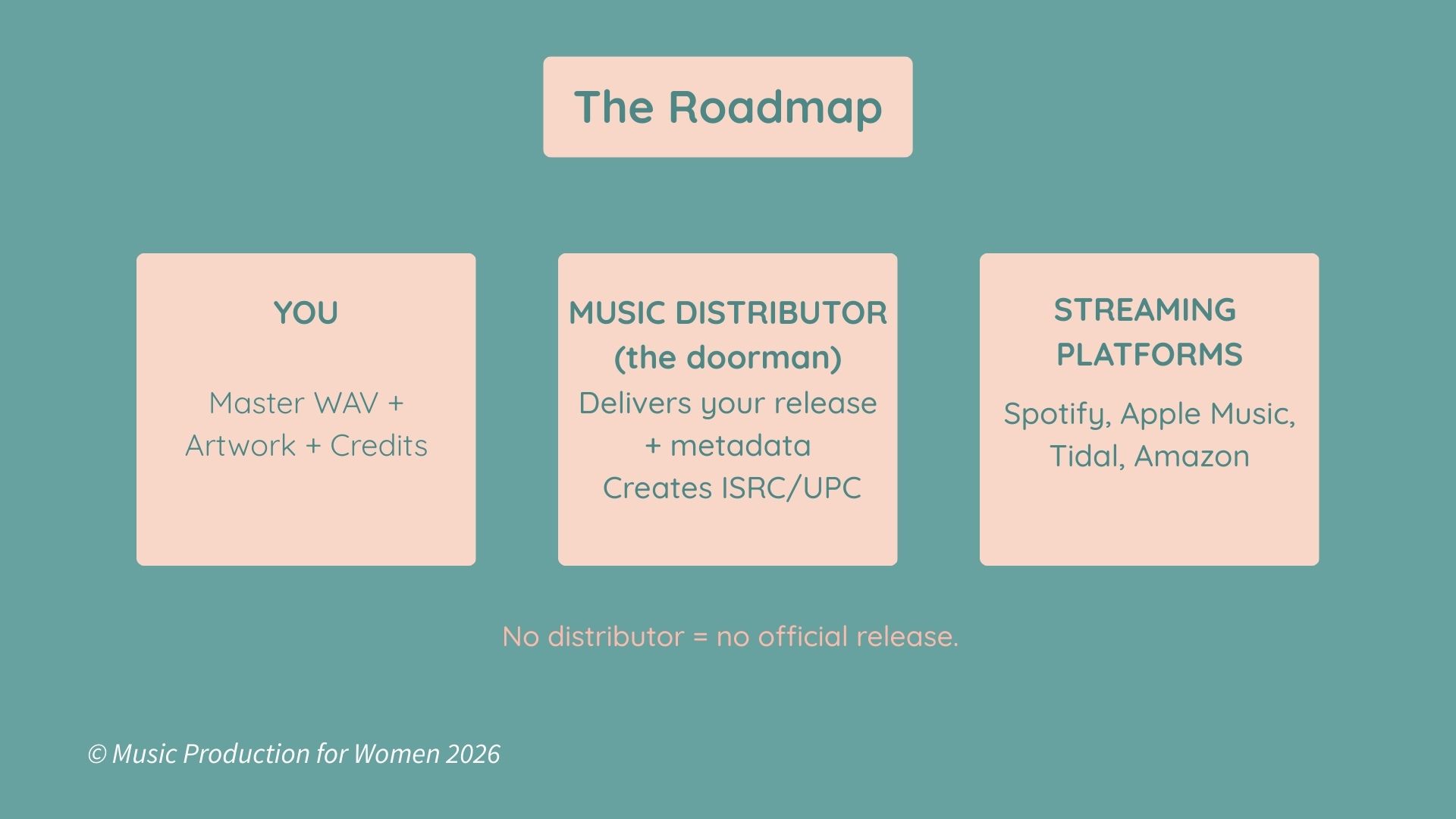
To release a song on streaming platforms (Spotify, Apple Music, Tidal, Amazon, etc.), you can’t just drag and drop your WAV and call it a day. You need a doorman for the VIP room.
That doorman is called a music distributor.
Here’s the deal: Spotify doesn’t want to talk to you directly (nothing personal). They don’t want millions of artists emailing them MP3s and “pls listen” messages. They want a verified pipeline with clean metadata, correct credits, and proper IDs, such as your ISRC.
So you upload your track to a distributor and say, “Cool, please deliver this to every platform in the world." The distributor becomes your backstage crew, getting your track onto every platform and making sure it shows up correctly (depending on the distributor, this may include royalty reporting and payments).
No distributor = no Spotify release. No Apple Music release. And no way for your mum to ask Alexa to play your song. It’s that simple.
That’s what an official music release means in 2026.
The 2026 Reality Check for Independent Artists
If you’re an independent artist, you don’t need a label just to distribute music anymore. Gone are the days of begging a suit in an office to approve your demo just so your song can exist online.
In 2026, the distribution pipeline is basically the same for everyone. Whether you’re a global superstar or a kid in a bedroom, the platforms are the same, the gate is open. You just need to walk through it with the right setup.
Your Roadmap
Don’t stare at the whole mountain; you’ll get vertigo. Let’s break this journey down into small stops so you can actually enjoy the view.
Here is the blueprint to go from “Bedroom Producer” to “Spotify Verified”:
The Profiles: Claim your artist pages (Spotify for Artists / Apple Music for Artists) so your release lands on the right profile, and you can pitch it properly.
The Prep: Gather your assets (Master WAV, Artwork, Credits). No more tweaks allowed.
The Admin: Handle the "Lawyer stuff" (PROs, ISRC, Content ID rules). Get your paperwork sorted before you stress out.
The Partner: Sign up for a distributor (DistroKid, TuneCore, CD Baby, etc.). Pick your vehicle.
The Upload: Input the "nerdy info" (Metadata). This ensures you get credit and stay visible.
The Strategy: Set your release date (4 weeks out) to trigger the algorithms.
The Drop: It goes live. You pop the champagne, host the release party, and watch the streams roll in.
Prep Before You Upload
Before you even think about logging into your distributor, stop.
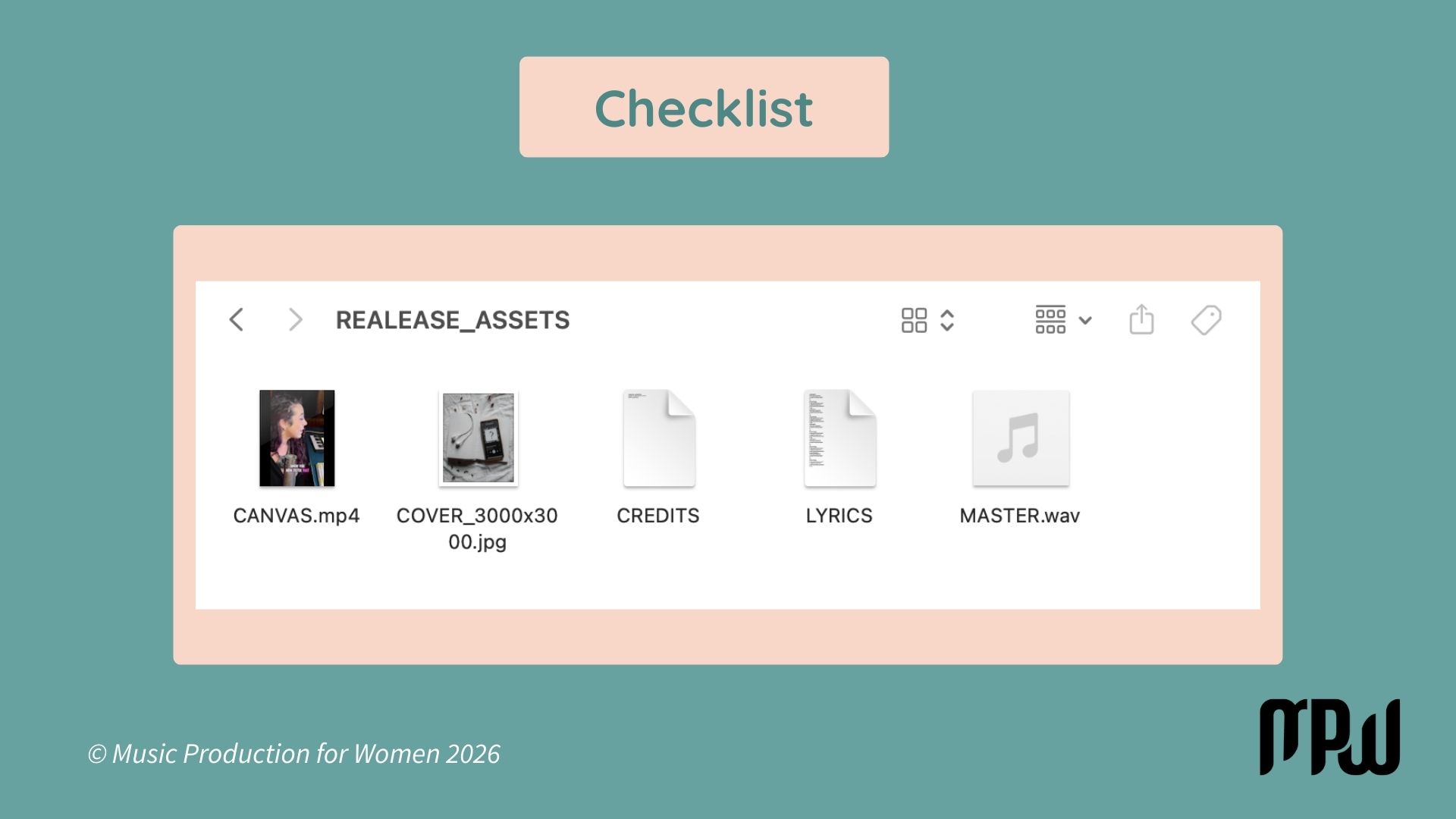
Create a folder on your desktop named “RELEASE_ASSETS.” Trying to upload without these things ready is like trying to cook dinner while you’re still shopping for groceries.
1) The Audio (No MP3s)
If you try to upload an MP3, the audiophile gods will strike you down. You need a high-quality WAV file.
The Specs: 16-bit or 24-bit / 44.1kHz.
Translation: Ask your mastering engineer for the “Master WAV for Streaming.”
DIY Note: If you are the engineer, double-check your bounce settings in your DAW. Ensure you are exporting at 44.1kHz and 16/24-bit.
2) The Artwork (Make it Square)
Size: 3000 x 3000 pixels. A perfect square.
Do not put social media handles, website URLs, or “Out Now!” text on the cover. They will reject it. Keep it clean: just the artist name and the song title (or just the art).
Optional: The Visuals
Streaming is visual now. Spotify loves it when you upload a Canvas, that 3-8 second looping video that plays on the mobile app.
It doesn’t have to be a movie; just a cool, vertical loop. Tracks with Canvases get shared way more often. Have a vertical video file ready to go.
3) The Credits
Who wrote the lyrics? Who made the beat? Write down their full legal names right now so you aren’t panic-texting them at 2 AM asking for their middle name.
Pro Tip: Have your Lyrics ready in a text file/Notes app. You might not need them for the initial upload, but you will need them after to sync with Spotify/Apple Music. It’s way easier to copy-paste now than to type them out from memory later.
4) Your Artist Profiles:
Before release day, claim your profiles:
Spotify for Artists: update your photo, bio, links
Apple and Amazon Music for Artists: same vibe, make sure your name, image, and bio match everywhere.
If your name is inconsistent, platforms can accidentally create a second “you.” That’s a headache you don’t want.
The Admin Stuff
Wait, wait, wait… we need to talk about the legal stuff.
Sit tight. This is a story for a brand-new article (seriously, it goes deep), but stay with me. I’m going to divide it into just the absolute essentials so you don’t get sued or go broke.
ISRC & UPCISRC & UPC
UPC: The barcode for the whole single. Your distributor handles this.
ISRC: The ID code for the specific recording. Your distributor handles this, too. Write this down. It’s the license plate for your song.
PRO (Performance Rights Organization)
This is how you get paid when your song plays on the radio or in a random H&M.
US: Sign up for ASCAP or BMI (one-time fee).
Rest of World: Find your local society (PRS, SIAE, SACEM, etc.).
If you used a Type Beat, you DO register it here, but you must credit the producer or buy the track.
100% AI songs: if a tool generates the full song with no human authorship, you generally can’t register it the same way. No human writer = no writer royalties to collect.
Master vs Publishing
When you release a song, the money comes from two rights. but it can arrive through multiple places.
1) Master (the recording)
This is money tied to the sound recording.
Paid by: streaming platforms/stores: your distributor
What it includes: your share of streams/downloads (the recording side)
2) Publishing (the song)
This is money tied to the composition (lyrics + melody). Publishing income doesn’t usually land in one single payout, it’s collected through a couple of channels depending on your country:
Performance royalties: collected via your PRO (radio, TV, venues, shops, etc.)
Mechanical royalties: often collected by a mechanical/publishing body or admin (varies by territory)
Same song, two rights. Your distributor covers the master side. Your PRO (and sometimes a publishing/mechanical admin) covers the publishing side. Different pipes, don’t mix them up.
YouTube Content ID
WARNING: This is where things get technical. Only check this box if you created 100% of the sound from scratch.
Splice / Loops: If you used a sample loop (even royalty-free), do not turn on Content ID. The robot matches audio waves and flags every other song that uses the same loop. It’s a mess.
Type Beats: Leased a beat? Then the Content ID button is lava. Don’t touch it. You generally don’t own the exclusive rights required to use this tool.
Fix: You can register these songs with your PRO, but you cannot use Content ID. If you didn’t bake the cake from scratch, don’t try to copyright the recipe. Leave the box unchecked.
How to Actually Release Your Song
Alright, we’re almost there. This is the mechanical part. It’s like filling out a tax form, but... well, slightly cooler.
1. Pick Your Distributor: DistroKid is the Toyota Camry of distributors, reliable, cheap, and gets you there. TuneCore and CD Baby are great options, too. There are tons out there, all with slight differences in percentages and tools. Pick one and marry it.

2. The Metadata: “Metadata” is just a fancy word for “labeling your stuff correctly.” If you get this wrong, your track vanishes into the digital void.
Artist Name: Spell it exactly the same way every time. If you are “Lil’ Joe” today and “Lil Joe” tomorrow, Spotify thinks you are two different people.
Explicit Tag: Does your song have explicit lyrics? Check the box. If you don’t, they will find you and take your song down.
Featured Artists: If your buddy rapped Verse 2, tag him in the specific "Featured Artist" field. Do not put “Lil Joe (feat. Buddy)” as the main artist name. That’s rookie behavior.
3. The Date
Do not release your song “As Soon As Possible.” Set the date for 4 weeks from today. Why? Because you need time to pitch to playlists and build hype. Once your release is delivered, go to Spotify for Artists and submit it for editorial consideration before release day. The earlier you pitch, the better. Even if you don’t land an editorial playlist, that lead time still fuels algorithmic discovery (pre-saves, saves, and day-one engagement).
The Launch Plan
You uploaded the song. Great. But if a tree falls in the forest and no one hears it, it flops.
Social media algorithms change faster than the weather, so go do your research on the best current strategies for TikTok, Reels, and Shorts. But whatever you do, do not forget the Pre-Save. It’s the only way to wake up the Spotify algorithm on day one.
Usually, once your distributor approves the track, you’ll have a 3–4 week runway before the official release date. Do not waste it. Here is your countdown schedule:
3 Weeks Out
Build your pre-save + smart link and put it everywhere.
Post 2–3 short teasers and start repeating the date.
Reach out to your inner circle and ask for day-one saves.
Release Day
Post the smart link first thing and pin it across platforms.
Ask for one clear action: Save the song and listen to it for more than 30 seconds (thank me later).
Drop 1–2 pieces of content: a performance clip, lyric video, or the “story behind the song.”
After Release
Keep it alive: post a breakdown, a live version, or behind-the-scenes footage.
Reply to people with short videos.
Update your Artist Pick (Spotify for Artists) and keep driving people to the same link.
Avoid Beginner Mistakes
Avoid these four traps, and you’re already doing better than 90% of independent artists.
The Oops Master: Uploading the wrong file version. (Label your final file “FINAL_MASTER_V3_REAL_THIS_TIME.wav”). If you upload the wrong one by accident, it can take ages to fix on streaming platforms. Save yourself the headache.
The Tomorrow Release: Releasing with zero notice. No one knows it exists. Don't drop it in a vacuum; give yourself that 3–4 week runway.
The Link Mess: Sending an Apple Music link to a friend who uses Spotify. Don't make them search for you. Use a Smart Link (like Linktree or Feature.fm) that gives them options.
The No Splits Disaster: Before release, do a simple split sheet (even a Google Doc) with names, roles, and percentages. Sign it. Screenshot it. Save it. Future-you will thank you.
Want to Start Producing But Not Sure Where to Start?

Final Thoughts
If you’ve read this far, your brain might feel a little fried. That’s normal. We just covered legal codes, international royalty collection, and file formats in one sitting.
But here is the truth: you only have to learn this stuff once.
The first time you release a song, it feels like disarming a bomb. The second time, it feels like doing laundry. By the third time, you won’t even think about it.
The worst thing you can do is let your music rot on a hard drive because you’re scared of filling out a form wrong.
Your music deserves to be heard and the tools are in your hands. So, take a deep breath and…release!